

mabo-ctl: one config to run your whole local dev stack
Overview
mabo-ctl, which we build, starts, checks and stops every service of a local dev stack from one YAML file. How it works, our stop tests against process-compose, overmind and honcho, and how it compares with foreman and docker compose.
One mabo-ctl.yaml and one mabo-ctl start brought up three services: an API, a web app that waited for the API to answer HTTP, and a background worker. Both web servers were ready in about 260 ms. Five seconds later, mabo-ctl status showed that the worker had died and printed the last line it wrote: queue "jobs" not found.
We build mabo-ctl, a single Go binary under the MIT license, for macOS and Linux. It starts, checks, stops and reports on every long-running process a repository needs during development. It replaces a terminal tab per service, and the server that keeps its port after a script stopped only its parent.
Checked 13 November 2026.
Why a local stack needs a supervisor
A typical repository runs a frontend, an API and a worker, often with a different runtime each. Run them in three terminals and you have three places to look for an error, no single answer to “is everything up?”, and nothing that tells the frontend which port the API landed on.
Stopping them is harder, because a dev command is rarely one process. npm run dev starts npm, npm starts a shell with sh -c, and the shell starts the server. They share a process group, and a terminal delivers Ctrl-C to the whole foreground group, as the POSIX terminal interface (opens in a new tab) specifies. A script or kill <pid> reaches only the one process it names.
We measured what that means. We started the same Node.js server six ways on macOS 27 (Node 20.17.0, npm 10.8.2, GNU Make 3.81), sent one signal to the process we had launched, and asked lsof two seconds later who held the port:
PORT=$port "$@" >/dev/null 2>&1 &   # e.g. npm run dev:chain
pid=$!
# ...wait until the port listens...
kill -TERM $pid; sleep 2
lsof -nP -t -iTCP:$port -sTCP:LISTEN   # empty means the port is free
With SIGTERM, two of six commands left the server holding the port: a chained npm script ("dev:chain": "node -e \"console.log('codegen')\" && node server.js") and a sh -c '…; true' wrapper. With SIGKILL, five of six did. Only node server.js run on its own gave the port back every time.
Probe results: 6 commands × 2 signals, 3 trials each
| Command | SIGTERM to the PID we started | SIGKILL to the PID we started |
|---|---|---|
node server.js |
port free, 3 of 3 | port free, 3 of 3 |
node --watch server.js |
free, 3 of 3 | held by node, 3 of 3 |
npm run dev |
free, 3 of 3 | held by node, 3 of 3 |
npm run dev:chain |
held by node, 3 of 3 | held by node, 3 of 3 |
make serve |
free, 3 of 3 | held by node, 3 of 3 |
sh -c 'node server.js; true' |
held by node, 3 of 3 | held by node, 3 of 3 |
The chained script shows the mechanism. npm forwards SIGINT and SIGTERM to the child it spawned; the list is in lib/signal-manager.js of @npmcli/run-script 8.1.0 (opens in a new tab), the version npm 10.8.2 bundles. With a single command the shell replaces itself with node, so the signal reaches the server. With && the shell has to stay alive to run the second command:
  PID  PPID  PGID COMMAND
49601 49598 49601 npm run dev:chain
49637 49601 49601 sh -c node -e "console.log('codegen')" && node server.js
49639 49637 49601 node server.js
npm signalled the shell, the only child it knows about. macOS /bin/sh is bash 3.2.57, and it exited without passing the signal on. The server stayed, adopted by PID 1 but still in group 49601:
  PID  PPID  PGID COMMAND
49639     1 49601 node server.js
POSIX kill() (opens in a new tab) signals every member of a group when the PID argument is negative, and kill -TERM -49601 freed the port that kill -TERM 49601 had left held. SIGKILL can’t be caught, so npm, make and node --watch die without telling their children anything. A timeout that escalates to SIGKILL on the launched PID leaves the server holding the port the same way.
Our architecture notes (opens in a new tab) record why mabo-ctl stops the whole process group: the shell script it replaced “accumulated 28 orphans in three days”.
How mabo-ctl works
Everything starts from mabo-ctl.yaml at the root of the repository. mabo-ctl finds it the way git finds .git, by walking up from the current directory, so every command works from any subdirectory. This is the file behind the opening:
stop_grace: 5s
services:
  - name: api
    dir: api
    port: 7200
    cmd: [node, server.js]
    env: {PORT: "{{.Port}}"}
    health: http://localhost:{{.Port}}/
  - name: web
    dir: web
    port: 7201
    cmd: [node, server.js]
    env:
      PORT: "{{.Port}}"
      API_URL: http://localhost:{{.Port "api"}}
    health: http://localhost:{{.Port}}/
    depends_on: [api]
    depends_ready_on: [api]
  - name: worker
    dir: worker
    cmd: [node, worker.js]
    env:
      API_URL: http://localhost:{{.Port "api"}}
    depends_on: [api]
cmd is a list rather than a shell string, so there is no quoting to get wrong. {{.Port "api"}} tells one service where another landed, which matters once ports move. mabo-ctl validates the whole file before it starts anything. Our first draft had depends_ready_on without depends_on, and mabo-ctl refused it with exit code 3: “a readiness gate orders nothing by itself — add it to depends_on so the start is ordered”.
start walks the dependency graph. Each service is launched in its own session (setsid), which makes it the leader of a new process group and detaches it from your terminal, so closing the tab leaves it running. Its output goes to .mabo-ctl/logs/<name>.log and its PID to .mabo-ctl/pids/. Its health check runs until it answers, the process dies or ready_timeout passes. A check can be an HTTP URL, a TCP port or a command, and web waited for api to answer before it started:
api     ● ready     ready in 259ms (pid 76743, HTTP 200)
worker  ◆ running   running (pid 76811, no health check declared)
web     ● ready     ready in 256ms (pid 76813, HTTP 200)
The state lives on disk, so mabo-ctl status in another terminal, or an hour later, gives the same answer. It reports one of seven phases: ready, running, slow, degraded, failed, exited and stopped. mabo-ctl never restarts a crashed service. It keeps the crash and the end of the log on screen instead of hiding them behind a restart:
worker   ⊘ exited    -     -      -      pid 76811 is gone and mabo-ctl did not stop it; no mabo-ctl was running when it exited, so there is no exit status
    worker: connecting to http://localhost:7200
    worker: queue "jobs" not found
Before it launches a service, mabo-ctl checks that service’s port with lsof. With a Python server already on 7200, mabo-ctl start api refused with exit code 4, named the holder and offered a way out:
api ✕ failed port already in use: port 7200 held by pid 78908 (Python) — inspect with: lsof -nP -iTCP:7200 -sTCP:LISTEN; or start it elsewhere with API_PORT=<port> mabo-ctl start apiAPI_PORT=7210 mabo-ctl start api brought it up on 7210, and mabo-ctl saved the choice in .mabo-ctl/run.env for the next start. The README (opens in a new tab) lists the five places a port can come from, from --port api=7210 down to the default in the file.
stop sends SIGTERM to the whole process group, waits stop_grace, then sends SIGKILL to whatever is left. Since v1.4.1 it also waits until every member of the group has exited, not only the process it launched.
Setting it up
The release binaries are static, for macOS and Linux on arm64 and amd64, and every release ships a SHA256SUMS. This is how we installed v1.4.1 for this guide:
gh release download v1.4.1 -R maborak/mabo-ctl -p mabo-ctl-darwin-arm64 -p SHA256SUMS
grep darwin-arm64 SHA256SUMS && shasum -a 256 mabo-ctl-darwin-arm64   # the two hashes must match
chmod +x mabo-ctl-darwin-arm64 && sudo mv mabo-ctl-darwin-arm64 /usr/local/bin/mabo-ctl
mabo-ctl --version
The README also documents an install script that checks the same SHA256SUMS and go install github.com/maborak/mabo-ctl/cmd/mabo-ctl@latest; we did not run either here. mabo-ctl init writes a commented starting file from what the repository contains (package.json with .nvmrc, manage.py, pyproject.toml, Cargo.toml), runs nothing it finds and adds .mabo-ctl/ to .gitignore.
Day to day, five commands cover most of the work:
| Command | What it does |
|---|---|
mabo-ctl start [svc…] |
Start in dependency order, wait for health checks, print the status block |
mabo-ctl status |
One line per service; --json for scripts |
mabo-ctl logs api -f |
Follow one log, or logs all for every log with labels |
mabo-ctl stop [svc…] |
Group SIGTERM, stop_grace, then SIGKILL |
mabo-ctl doctor |
Stale PIDs, foreign port holders, crashes nobody saw |
In CI, mabo-ctl health --wait --timeout=60s blocks until every declared check answers. With the API stopped and --timeout=3s, it gave up and exited 4:
error: timed out after 3s waiting for api to answer their health URLstatus --json is the documented machine contract: per service it carries phase, pid, port, http_status, log_path, started_at, uptime_ms, exit_code and exit_signal.
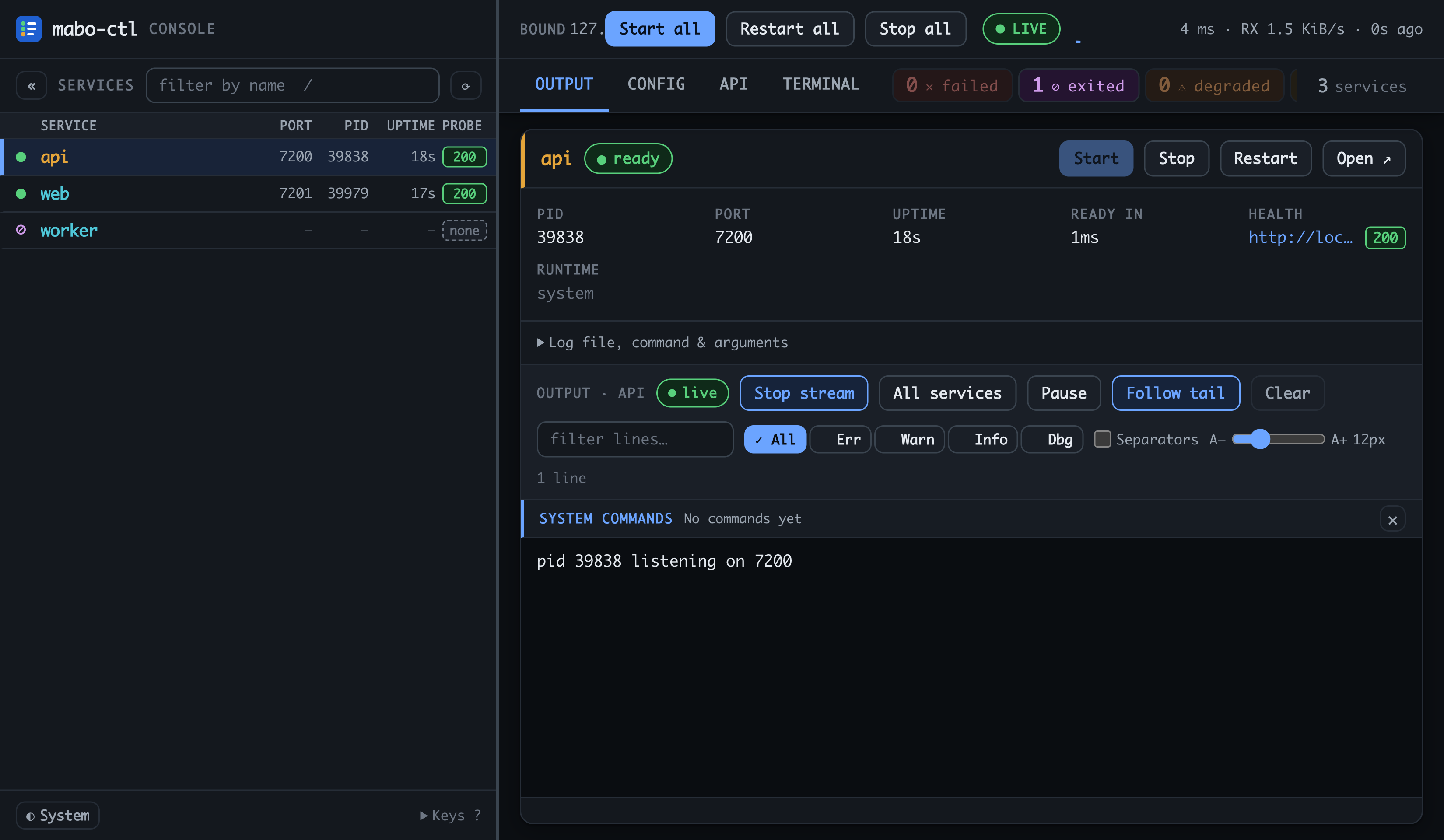
mabo-ctl serve opens a web console on 127.0.0.1:7999 with a session token. It starts, stops and restarts services and streams their logs. A non-loopback address is refused unless you pass --i-know-this-is-dangerous.
What we tested
We ran the six commands from the first section as mabo-ctl services, once on v1.4.0 and once on v1.4.1. Both times mabo-ctl stop freed all six ports, including the chained npm script and the shell wrapper that keep their port when only the parent is signalled.
Then we added a harder case: a server that ignores SIGTERM, as one stuck in a slow shutdown hook does, started through a shell wrapper (sh -c "node stubborn.js; true"). On v1.4.0 the shell exited on SIGTERM, mabo-ctl saw its leader gone and reported the service stopped, and no SIGKILL followed. The server kept port 7107 in 3 of 3 runs. When the stubborn server was itself the group leader, the escalation worked: “did not exit within 3s — escalating to SIGKILL”, port free, 3 of 3.
We fixed it the same day. v1.4.1 (opens in a new tab) waits until the whole group has exited and escalates when any member is left. Its changelog describes the case: “A shell wrapper that exits on SIGTERM, around a server that ignores it, read as stopped at once”. On v1.4.1 both stubborn services ended with “stopped (SIGKILL)” and free ports, 3 of 3.
We then ran the same three hard cases under each tool and checked the ports 15 seconds after the stop command returned. The stubborn server in this round ignores SIGINT, SIGTERM and SIGHUP:
| Tool, default settings | Stop command | Returned after | sh -c wrapper |
npm && chain |
Wrapper around a stubborn server |
|---|---|---|---|---|---|
mabo-ctl 1.4.1 (stop_grace 10 s, the default) |
mabo-ctl stop |
10.5 s | free, 3 of 3 | free, 3 of 3 | free, 3 of 3 |
| process-compose 1.124.0 | process-compose down |
0.0 s | free, 3 of 3 | free, 3 of 3 | held, 3 of 3 |
| overmind 2.5.1 | overmind quit |
at once; quit does not wait |
free, 3 of 3 | free, 3 of 3 | free, 3 of 3 |
| honcho 2.0.0 | SIGTERM to honcho start |
5.2 s | free, 3 of 3 | free, 3 of 3 | free, 3 of 3 |
process-compose signals the process group too, and its documentation (opens in a new tab) says SIGKILL follows only “in case the shutdown.timeout_seconds is defined”. With timeout_seconds: 10 set on the stubborn service, the port was still held in 3 of 3 runs. With the stubborn server as the group leader, process-compose waited 10 seconds and freed the port, 3 of 3. That is the pattern mabo-ctl had in v1.4.0: in the process-compose source the kill timer is cancelled when the launched process exits, which here is the wrapper; we did not trace it further. overmind and honcho freed every port. Both escalate to SIGKILL after 5 seconds by default, where mabo-ctl waits its default 10.
How mabo-ctl compares
Every tool in the table runs several processes from one file. They differ in what they know about those processes. The cells come from each project’s documentation and source at the version shown, and our runs above check the stop row for mabo-ctl, process-compose, overmind and honcho.
| mabo-ctl 1.4.1 | process-compose 1.124.0 | overmind 2.5.1 | foreman 0.90 / honcho 2.0 | docker compose 5.7 | |
|---|---|---|---|---|---|
| Config | mabo-ctl.yaml |
process-compose.yaml |
Procfile |
Procfile |
compose.yaml |
| Health checks | HTTP, TCP, command | HTTP, command, log line; no TCP | none | none | command only |
| Start order with “wait until healthy” | depends_on, depends_ready_on |
depends_on with process_healthy |
none | none | depends_on with service_healthy |
| Stop reaches | whole group, waits for all of it | whole group; SIGKILL only with timeout_seconds, shutdown.command or send_keys |
whole group; SIGINT, then SIGKILL after 5 s while the pane’s process is alive | foreman: direct children when signalled, the whole group on Ctrl-C in its terminal; honcho: group, SIGKILL after a fixed 5 s | whole container: SIGTERM to PID 1, SIGKILL after 10 s |
| Keeps running after the terminal closes | yes, by default | up -D |
start -D |
no | up -d |
| Second terminal sees the state | yes, state on disk | REST API, attach |
socket, tmux connect |
no | yes |
| Port already in use | refuses that service, names the holder | not checked | not checked | not checked | container fails to bind; holder not named |
| Crashed service | shown as exited with log tail; no restart |
restart policies | -r restart; default stops all |
everything stops | restart policies |
| Machine output | status --json, exit codes 0–4 |
REST, -o json |
plain text | exit status | ps --format json |
| AI assistant (MCP) | no | built in | no | no | no |
| Platforms | macOS, Linux | macOS, Linux, Windows | Linux, BSD, macOS | macOS, Linux, Windows | macOS, Linux, Windows |
Sources for the table: process-compose docs (opens in a new tab) and source at v1.124.0 (opens in a new tab), overmind at v2.5.1 (opens in a new tab), foreman at v0.90.0 (opens in a new tab), honcho at v2.0.0 (opens in a new tab), and the Compose file reference (opens in a new tab).
mabo-ctl fits the problem this guide started with: services launched through npm scripts, shells and reloaders that must stop completely, and a port you need to know is free before starting. In the table it is the one tool that refuses to launch a service whose port is taken and names the process holding it, and the one with a native TCP check alongside HTTP and command checks. In our stop runs it freed every port, as overmind and honcho did. process-compose left the wrapped stubborn server holding its port with and without timeout_seconds.
process-compose is the closest alternative and is ahead in places: it restarts crashed processes when you ask it to, runs on Windows and ships an MCP server today. Pick it if you want automatic restarts. Set shutdown.timeout_seconds and start anything that may ignore SIGTERM directly rather than through a shell wrapper, because in our runs the timeout freed the port only when the stubborn server led its group. docker compose is the right tool for the parts of a stack that should run in containers, such as PostgreSQL or Redis, and mabo-ctl can wait for them with a TCP check. foreman, honcho and overmind suit a short Procfile with no health checks and no ordering.
Sources
- mabo-ctl v1.4.1, Maborak Technologies, released 13 November 2026, commit 68a500d. README (opens in a new tab), CHANGELOG (opens in a new tab), docs/ARCHITECTURE.md (opens in a new tab). Commands, phases, port precedence, the stop fix and the origin of the project.
- mabo-ctl v1.4.0, released 11 November 2026, commit 3fc1f7f. Release (opens in a new tab). The version with the stop bug we reproduced.
- npm
@npmcli/run-script8.1.0,lib/signal-manager.js(opens in a new tab). npm forwards SIGINT and SIGTERM to its child. - POSIX.1-2024, The Open Group,
kill()(opens in a new tab) and General Terminal Interface (opens in a new tab). Signals to a process group, and Ctrl-C to the foreground group. - process-compose v1.124.0, released 26 October 2026. Launcher docs (opens in a new tab), health docs (opens in a new tab),
src/app/process.go(opens in a new tab). Group stop, when SIGKILL follows and when its timer is cancelled, probes, restart policies, MCP. - overmind v2.5.1, released 26 March 2024, README and source (opens in a new tab). Procfile, tmux, SIGINT to the group, 5 s timeout, platforms.
- foreman v0.90.0 (RubyGems, 27 July 2025),
lib/foreman/engine.rb(opens in a new tab). Signals each child PID,-ttimeout. - honcho v2.0.0, released 6 October 2024,
honcho/manager.py(opens in a new tab). Group signals, 5 s before SIGKILL. - Docker Compose v5.7.1, released 11 November 2026, Compose file reference: services (opens in a new tab) and
docker container stop(opens in a new tab).healthcheck,depends_on,stop_grace_period,restart, SIGTERM then SIGKILL to the container. - Our runs, 13 November 2026, macOS 27 on arm64, Node 20.17.0, npm 10.8.2, GNU Make 3.81, tmux 3.8. Release binaries checked against their published SHA-256 sums. The probe, the demo stack and the comparison runs.


