

Kubernetes Secrets Management: Which Approach Fits, With a Working Demo of Each
Overview
Native Secrets, RBAC, encryption at rest with KMS v2, Sealed Secrets, SOPS with Flux and Argo CD, External Secrets Operator, the Vault Secrets Operator, the Secrets Store CSI driver, the Vault Agent sidecar and direct Vault access. What each changes, a demo with captured output, and the catch we hit.
A Kubernetes Secret is encoded, not protected. On an unmodified cluster the value sits in etcd as readable bytes, and anyone allowed to list Secrets in a namespace can read every value in it. Almost every secrets tool for Kubernetes changes one of three things: where the value is kept, who can read it, or how it reaches the pod. It leaves the other two as they were.
This guide runs each approach on a kind cluster, shows what it changes and what it leaves alone, and gives you the commands to repeat it. The captured output of every demo sits next to it in a collapsed block. Read the map first, then the section for the approach you are weighing.
Checked 8 November 2026.
How we tested, and how far to trust it
Everything marked tested ran on 8 November 2026 in throwaway kind v0.33.0 clusters (Kubernetes v1.37.0) on a laptop, with Helm, kubectl, kubeseal v0.41.2, sops 3.13.3 and age 1.3.2 installed. Vault 2.0.4 ran in dev mode as the external store, because the lab has no cloud account. The other versions are named where they appear: ESO 2.14.0, Argo CD 3.6.1, Flux v2.10.0, KSOPS v4.5.1, the Vault Secrets Operator 1.6.2, the KMS plugin v1.4.0 and Jenkins 2.580.2. Each result is one observation, not a rate, and times such as “by the first check, 20 seconds later” describe that run only. Anything marked docs only comes from the project’s documentation and was not run; only two setups are left in that state, ESO with Flux and ESO with AWS. Secret values in the captures are lab values; never copy dev-mode Vault, its root token root, or the sample encryption key to a real cluster.
Most demos run on ksec, a plain kind create cluster --name ksec. The encryption section builds two more clusters, and the ESO section names its own.
The map
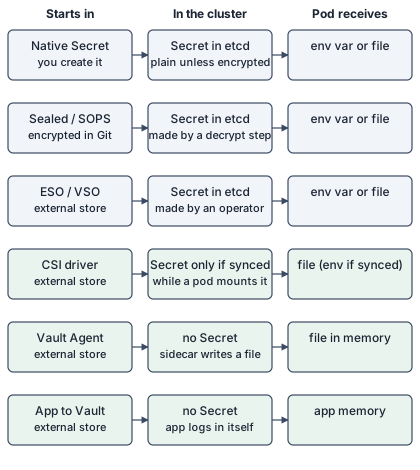
The rows answer different questions, so they are not substitutes for each other:
| You want to… | Read | Status |
|---|---|---|
| know what a Secret is and what it exposes | Native Secrets, How a pod consumes one | tested |
| limit who can read Secrets through the API | Who can read Secrets | tested |
| protect etcd and its backups | Encryption at rest | tested |
| keep encrypted secrets in Git, no external store | Sealed Secrets, SOPS with age, SOPS with Flux, SOPS with Argo CD | tested |
| keep the source of truth in a vault and get Secret objects | External Secrets Operator, Vault Secrets Operator | tested |
| keep values out of etcd, delivered as files | CSI driver, Vault Agent | tested |
| keep values out of the cluster except the app’s memory | The app talks to Vault | tested |
Native Secrets
What it is and how it works
A Secret is an API object holding small values (the limit is 1 MiB), stored by the API server in etcd. Kubernetes defines types that tools and the kubelet understand [1]. We created six of them:
kubectl create namespace demo
kubectl -n demo create serviceaccount app
kubectl -n demo create secret generic app-opaque --from-literal=password=s3cr3t-value
openssl req -x509 -newkey rsa:2048 -nodes -days 1 -subj "/CN=demo.local" -keyout tls.key -out tls.crt
kubectl -n demo create secret tls app-tls --cert=tls.crt --key=tls.key
kubectl -n demo create secret docker-registry app-registry \
  --docker-server=registry.example.com --docker-username=user --docker-password=pw
# basic-auth, ssh-auth and a legacy service-account token are applied from YAML
The basic-auth and ssh-auth Secrets use type: kubernetes.io/basic-auth and type: kubernetes.io/ssh-auth with stringData. A legacy token is a Secret of type kubernetes.io/service-account-token annotated with kubernetes.io/service-account.name: app; the modern alternative is kubectl create token app --duration=10m, which prints a short-lived token.
Demo
The commands above, then a look at what the cluster holds. kubectl get secrets lists the types, base64 -d decodes a value, and etcdctl read directly from the etcd pod shows what is stored:
kubectl -n demo get secrets
kubectl -n demo get secret app-opaque -o jsonpath='{.data.password}' | base64 -d
kubectl -n kube-system exec etcd-ksec-control-plane -- etcdctl \
  --endpoints=https://127.0.0.1:2379 --cacert=/etc/kubernetes/pki/etcd/ca.crt \
  --cert=/etc/kubernetes/pki/etcd/server.crt --key=/etc/kubernetes/pki/etcd/server.key \
  get /registry/secrets/demo/app-opaque --print-value-only | strings
Captured output: the six types, then the value decoded (kind-ksec, 21:07 UTC, one run)
# Native Kubernetes Secrets, RBAC and injection, 2026-11-08T21:07:44Z, cluster kind-ksec (kind v0.33.0, Kubernetes v1.37.0)
## 1. Built-in Secret types
secret/app-opaque created
secret/app-tls created
secret/app-registry created
secret/app-basic created
secret/app-ssh created
secret/app-sa-token created
$ kubectl -n demo get secrets
NAME           TYPE                                  DATA   AGE
app-basic      kubernetes.io/basic-auth              2      3s
app-opaque     Opaque                                1      3s
app-registry   kubernetes.io/dockerconfigjson        1      3s
app-sa-token   kubernetes.io/service-account-token   3      3s
app-ssh        kubernetes.io/ssh-auth                1      3s
app-tls        kubernetes.io/tls                     2      3s
$ legacy token Secret: first characters of .data.token (a JWT)
eyJhbGciOiJSUzI1NiIsImtp

$ kubectl -n demo create token app --duration=10m   (short-lived): first characters
eyJhbGciOiJSUzI1NiIsImtp

## 2. Base64 is encoding, not encryption
$ kubectl -n demo get secret app-opaque -o jsonpath={.data.password}
czNjcjN0LXZhbHVl
$ ... | base64 -d
s3cr3t-value
Captured output: what etcd holds on this cluster (kind-ksec, 21:07 and 21:17 UTC, one run)
## 3. What etcd stores (no encryption at rest on this cluster)
$ etcdctl get /registry/secrets/demo/app-opaque --print-value-only | strings
Secret
app-opaque
demo"
*$8aca7f1a-b56f-4be5-a18e-15a5af76495b2
....
kubectl-create
Update
....


# What etcd holds for a native Secret, 2026-11-08T21:17:07Z, cluster kind-ksec (no encryption at rest)
$ etcdctl get /registry/secrets/demo/app-opaque --print-value-only | grep -c rotated-value   # the value written by the patch
   2 password
   1 rotated-value
Pros and cons
Pros
- Nothing to install, and the types give tools a shared format for certificates, registry credentials and tokens [1].
kubectl create token app --duration=10mprinted a short-lived token for the service account, as an alternative to a long-lived token Secret.
Cons
- Base64 is encoding. The value decoded with no key, and on this cluster the raw etcd bytes contained it, as the capture shows.
- Kubernetes’ own docs say Secrets are “by default, stored unencrypted in the API server’s underlying data store (etcd)” [1].
How a pod consumes one
What it is and how it works
A container can read a Secret as an environment variable or as a file from a mounted volume. The two differ in exposure and in what happens when the Secret changes.
Demo
apiVersion: v1
kind: Pod
metadata: {name: consumer, namespace: demo}
spec:
  containers:
    - name: app
      image: busybox:1.37
      command: ["sleep","3600"]
      env:
        - name: PASS_ENV
          valueFrom: {secretKeyRef: {name: app-opaque, key: password}}
      volumeMounts: [{name: s, mountPath: /etc/s, readOnly: true}]
  volumes: [{name: s, secret: {secretName: app-opaque}}]
We read the environment of process 1, listed the mount, then patched the Secret and sampled both the variable and the file every 20 seconds:
Captured output: env var and file, then the Secret patched, then an immutable Secret (kind-ksec, 21:07 UTC, one run)
## 4. Env var versus volume
pod/consumer created
pod/consumer condition met
$ the env var is visible in the process environment
PASS_ENV=s3cr3t-value
$ the volume is a tmpfs
tmpfs on /etc/s type tmpfs (ro,relatime,size=65714556k,inode64,noswap)
$ the file
total 0
lrwxrwxrwx    1 root     root            15 Nov  8 21:07 password -> ..data/password
s3cr3t-value
secret/app-opaque patched
# Secret changed at 21:07:54
t+20s env=s3cr3t-value file=rotated-value
t+40s env=s3cr3t-value file=rotated-value
t+60s env=s3cr3t-value file=rotated-value
t+81s env=s3cr3t-value file=rotated-value
t+101s env=s3cr3t-value file=rotated-value
t+121s env=s3cr3t-value file=rotated-value

## 5. Immutable Secret
secret/app-immutable created
The Secret "app-immutable" is invalid: data: Forbidden: field is immutable when `immutable` is set
An immutable Secret refuses edits. Kubernetes’ docs say that once it is marked immutable you can only delete and recreate it [1]:
apiVersion: v1
kind: Secret
metadata: {name: app-immutable, namespace: demo}
immutable: true
stringData: {k: v1}
Pros and cons
Pros
- A volume is a
tmpfs, so the kubelet does not write the values to durable storage [1]. The capture shows the mount type. - A mounted file follows a Secret update. In this run it changed by the first check, 20 seconds later; the docs say the delay can be as long as the kubelet sync period plus cache propagation, and that a
subPathmount gets no updates [1]. immutable: truestops accidental edits. Patching ours failed withfield is immutable whenimmutableis set.
Cons
- An environment variable is fixed when the container starts. It stayed at the old value through the last sample at 121 seconds, so a rotation needs a restart.
- The variable is visible in the process environment (
/proc/1/environin the capture), which log dumps and debug commands can expose. A file avoids that, though anyone who can exec into the pod can read both.
Who can read Secrets
What it is and how it works
Kubernetes RBAC decides who can read a Secret through the API. The docs warn that granting list or watch on Secrets lets a subject read all Secret data in that namespace, not only the Secrets its pods reference [1]. We tested that and a second route.
Demo
kubectl -n demo create role list-secrets --verb=list --resource=secrets
kubectl -n demo create rolebinding lister --role=list-secrets --serviceaccount=demo:lister
kubectl -n demo create role make-pods --verb=create --resource=pods
kubectl -n demo create rolebinding creator --role=make-pods --serviceaccount=demo:creator
kubectl -n demo auth can-i get secret/app-basic --as=system:serviceaccount:demo:lister
kubectl -n demo get secrets -o jsonpath='{.items[?(@.metadata.name=="app-basic")].data.password}' \
  --as=system:serviceaccount:demo:lister | base64 -d
For the second route, the creator service account, which can only create pods, created a pod that mounts app-basic and prints the file; then an administrator read the pod’s log:
Captured output: list, get and create pods (kind-ksec, 21:07 UTC, one run)
## 6. RBAC: what list, get and create pods give
serviceaccount/lister created
serviceaccount/creator created
serviceaccount/nobody created
role.rbac.authorization.k8s.io/list-secrets created
rolebinding.rbac.authorization.k8s.io/lister created
role.rbac.authorization.k8s.io/make-pods created
rolebinding.rbac.authorization.k8s.io/creator created
$ can-i get secret as lister: no   can-i list secrets: yes
$ can-i get secret as nobody: no   can-i list secrets: no
$ as "lister" (verb list only): kubectl get secrets -o jsonpath of a password
Error from server (Forbidden): secrets "app-basic" is forbidden: User "system:serviceaccount:demo:lister" cannot get res
t0ps3cret
$ as "nobody" (no secret permissions)
Error from server (Forbidden): secrets is forbidden: User "system:serviceaccount:demo:nobody" cannot list resource "secrets" in API group "" in the namespace "d
$ as "creator" (create pods only): create a pod that mounts app-basic, then an admin reads its log
pod/sneaky created
Error from server (Forbidden): secrets "app-basic" is forbidden: User "system:serviceaccount:demo:creator" cannot get resource "secrets" in
admin reads the log of the pod the creator made: t0ps3cret
Pros and cons
Pros
- RBAC needs no extra software, and a service account with no Secret verbs got
Forbidden. kubectl auth can-i --as=...shows what an identity can do before you grant it.
Cons
- The
listverb reads values even whengetby name is refused:can-i getanswered no, and thejsonpathquery still returned the password. - A service account that can create pods in a namespace can read that namespace’s Secrets by mounting them. Our
creatorcould notgetthe Secret, yet the pod it made printed it. Restrictpodscreation as carefully assecrets.
Encryption at rest
What it is and how it works
Encryption at rest changes how the API server writes Secrets to etcd. It does not change who can read them through the API. You enable it by pointing the API server at an EncryptionConfiguration file with --encryption-provider-config [2]. The providers differ in where the key lives: identity stores plain text, aescbc and aesgcm read a key from the file on the control-plane host, and a KMS provider uses a key held by an external service. Kubernetes’ provider table rates aescbc weak and not recommended, because of CBC’s padding-oracle weakness and because the key sits on the control-plane host, and rates KMS v2 strongest, stable since v1.29 [2]. The main demo here therefore uses KMS v2.
With KMS v2 the API server calls a plugin over a Unix socket on the control-plane host, and the plugin uses a key that stays in the external KMS [2]. We used an open-source plugin, vault-kubernetes-kms v1.4.0 [12], with the transit engine of Vault 2.0.4 (dev mode, in a Docker container) as the KMS.
Demo
Vault runs first, on the Docker network that kind uses. If that network does not exist yet, create any kind cluster once, or run docker network create kind:
docker run -d --name kms-vault --network kind --cap-add IPC_LOCK \
  -e VAULT_DEV_ROOT_TOKEN_ID=root hashicorp/vault:2.0.4
V() { docker exec -e VAULT_ADDR=http://127.0.0.1:8200 -e VAULT_TOKEN=root kms-vault vault "$@"; }
V secrets enable transit
V write -f transit/keys/kms
Three files wire the plugin into the control plane: the encryption configuration, which holds no key material; the plugin as a static pod; and the kind configuration that mounts both files and points the API server at the configuration:
EncryptionConfiguration for KMS v2 (encryption_provider_config_v2.yml)
kind: EncryptionConfiguration
apiVersion: apiserver.config.k8s.io/v1
resources:
  - resources: [secrets]
    providers:
      - kms:
          apiVersion: v2
          name: vault-kubernetes-kms
          endpoint: unix:///opt/kms/vaultkms.socket
      - identity: {}
The plugin as a static pod (vault-kubernetes-kms.yml)
apiVersion: v1
kind: Pod
metadata:
  name: vault-kubernetes-kms
  namespace: kube-system
spec:
  priorityClassName: system-node-critical
  hostNetwork: true
  containers:
    - name: vault-kubernetes-kms
      image: falcosuessgott/vault-kubernetes-kms:v1.4.0
      imagePullPolicy: IfNotPresent
      command:
        - /vault-kubernetes-kms
        - -vault-address=http://kms-vault:8200
        - -auth-method=token
        - -token=root
      volumeMounts:
        - name: kms
          mountPath: /opt/kms
      livenessProbe:
        httpGet: {path: /health, port: 8080}
      readinessProbe:
        httpGet: {path: /live, port: 8080}
  volumes:
    - name: kms
      hostPath: {path: /opt/kms}
kind configuration (kind-kms.yaml)
kind: Cluster
apiVersion: kind.x-k8s.io/v1alpha4
nodes:
  - role: control-plane
    extraMounts:
      - containerPath: /etc/kubernetes/encryption_provider_config_v2.yaml
        hostPath: /path/to/encryption_provider_config_v2.yml
        readOnly: true
        propagation: None
      - containerPath: /etc/kubernetes/manifests/vault-kubernetes-kms.yaml
        hostPath: /path/to/vault-kubernetes-kms.yml
        readOnly: true
        propagation: None
    kubeadmConfigPatches:
      - |
        kind: ClusterConfiguration
        apiServer:
          extraArgs:
            encryption-provider-config: "/etc/kubernetes/encryption_provider_config_v2.yaml"
          extraVolumes:
            - name: encryption-config
              hostPath: "/etc/kubernetes/encryption_provider_config_v2.yaml"
              mountPath: "/etc/kubernetes/encryption_provider_config_v2.yaml"
              readOnly: true
              pathType: File
            - name: socket
              hostPath: "/opt/kms"
              mountPath: "/opt/kms"
kind create cluster --name ksec-kms --config kind-kms.yamlWe wrote a Secret, rotated the transit key, wrote a second Secret, then paused the Vault container (it stays in memory, only unreachable). With Vault paused we read and wrote Secrets, restarted the API server, and read again; finally we unpaused Vault. The prefix and the vault:vN: marker come from the raw etcd bytes:
Captured output: KMS v2 with Vault transit: prefix, rotation, Vault paused, API server restart (kind-ksec-kms, 22:34 UTC, one run)
# Encryption at rest with a KMS v2 plugin backed by Vault transit, 2026-11-08T22:34:38Z, cluster kind-ksec-kms
$ the plugin pod and the API server flag
NAME                                          READY   STATUS    RESTARTS   AGE
vault-kubernetes-kms-ksec-kms-control-plane   0/1     Running   0          8s
--encryption-provider-config=/etc/kubernetes/encryption_provider_config_v2.yaml

$ EncryptionConfiguration (no key material in the file)
kind: EncryptionConfiguration
apiVersion: apiserver.config.k8s.io/v1
resources:
  - resources: [secrets]
    providers:
      - kms:
          apiVersion: v2
          name: vault-kubernetes-kms
          endpoint: unix:///opt/kms/vaultkms.socket
      - identity: {}

$ Vault transit key before
{'name': 'kms', 'type': 'aes256-gcm96', 'latest_version': 1, 'keys': ['1']}
namespace/demo created
secret/before-rotation created
$ etcd: what is stored for the new Secret
plaintext present=0 prefix=k8s:enc:kms:v2:vault-kubernetes-kms:. transit key version in the payload=vault:v1:
API returns: kms-value-one

$ rotate the Vault transit key, then write another Secret
latest_version            2
secret/after-rotation created
before-rotation: plaintext present=0 prefix=k8s:enc:kms:v2:vault-kubernetes-kms:. transit key version in the payload=vault:v1:
after-rotation:  plaintext present=0 prefix=k8s:enc:kms:v2:vault-kubernetes-kms:. transit key version in the payload=vault:v2:
both readable through the API: kms-value-one / kms-value-two

$ pause the Vault container (unreachable, data kept), then read and write Secrets without restarting the API server
# Vault paused at 22:34:59
read an existing Secret: kms-value-one
secret/while-paused created

$ restart the API server while Vault is paused (move its static pod manifest away and back)
t+10s readyz=[Unable to connect to the server: EOF] secret=[Error from server (Forbidden): secrets "before-rotation" is forbidden: User "kubernetes-admin" cannot get reso]
t+20s readyz=[Error from server (InternalError): an error on the] secret=[Error from server (InternalError): Internal error occurred: StorageError: corrupt object, Code: 7, Key: /secre]
t+30s readyz=[Error from server (InternalError): an error on the] secret=[Error from server (InternalError): Internal error occurred: StorageError: corrupt object, Code: 7, Key: /secre]
t+40s readyz=[Error from server (InternalError): an error on the] secret=[Error from server (InternalError): Internal error occurred: StorageError: corrupt object, Code: 7, Key: /secre]
t+50s readyz=[Error from server (InternalError): an error on the] secret=[Error from server (InternalError): Internal error occurred: StorageError: corrupt object, Code: 7, Key: /secre]
t+60s readyz=[Error from server (InternalError): an error on the] secret=[Error from server (InternalError): Internal error occurred: StorageError: corrupt object, Code: 7, Key: /secre]

$ unpause Vault
# Vault unpaused at 22:36:34
t+15s secret=[kms-value-one] while-paused=[kms-value-three]
t+30s secret=[kms-value-one] while-paused=[kms-value-three]
t+45s secret=[kms-value-one] while-paused=[kms-value-three]
t+60s secret=[kms-value-one] while-paused=[kms-value-three]
In an earlier run we stopped and started the Vault container instead of pausing it. Dev mode keeps data in memory, so the restarted Vault was empty and the transit key was gone:
Captured output: the earlier run, where the dev-mode Vault was stopped and started and so lost the key (kind-ksec-kms, 22:30 UTC, one run)
$ stop Vault, then restart the API server (move its static pod manifest away and back)
# Vault stopped at 22:30:44
read before restart: kms-value-one
t+10s readyz=[Unable to connect to the server: EOF] secret=[Error from server (Forbidden): secrets "before-rotation" is forbidden: User "kubernetes-admin" cannot get resource "secr]
t+20s readyz=[Error from server (InternalError): an error on the server ("] secret=[Error from server (InternalError): Internal error occurred: StorageError: corrupt object, Code: 7, Key: /secrets/demo/be]
t+30s readyz=[Error from server (InternalError): an error on the server ("] secret=[Error from server (InternalError): Internal error occurred: StorageError: corrupt object, Code: 7, Key: /secrets/demo/be]
t+40s readyz=[Error from server (InternalError): an error on the server ("] secret=[Error from server (InternalError): Internal error occurred: StorageError: corrupt object, Code: 7, Key: /secrets/demo/be]
t+50s readyz=[Error from server (InternalError): an error on the server ("] secret=[Error from server (InternalError): Internal error occurred: StorageError: corrupt object, Code: 7, Key: /secrets/demo/be]
t+60s readyz=[Error from server (InternalError): an error on the server ("] secret=[Error from server (InternalError): Internal error occurred: StorageError: corrupt object, Code: 7, Key: /secrets/demo/be]
t+70s readyz=[Error from server (InternalError): an error on the server ("] secret=[Error from server (InternalError): Internal error occurred: StorageError: corrupt object, Code: 7, Key: /secrets/demo/be]
t+80s readyz=[Error from server (InternalError): an error on the server ("] secret=[Error from server (InternalError): Internal error occurred: StorageError: corrupt object, Code: 7, Key: /secrets/demo/be]

$ start Vault again
# Vault started at 22:32:44
Initialized     true
Sealed          false
(dev mode keeps data in memory: a restarted container is a new Vault, so the transit key is gone unless it was kept)
t+15s secret=[Error from server (InternalError): Internal error occurred: StorageError: corrupt object, Code: 7, K]
t+30s secret=[Error from server (InternalError): Internal error occurred: StorageError: corrupt object, Code: 7, K]
t+45s secret=[Error from server (InternalError): Internal error occurred: StorageError: corrupt object, Code: 7, K]
t+60s secret=[Error from server (InternalError): Internal error occurred: StorageError: corrupt object, Code: 7, K]
Writes made before encryption was on stay readable, whatever the provider. We tested that with the local aescbc provider, because it needs no external service: a Secret went in while identity was first, then we switched the order and restarted the API server. The old Secret stayed plaintext in etcd and a new one was encrypted. Running the rewrite command from the docs encrypted the old one [2]:
kubectl get secrets --all-namespaces -o json | kubectl replace -f -For that test the cluster used this configuration file and kind configuration, with a key from openssl rand -base64 32:
EncryptionConfiguration with aescbc (enc.yaml)
apiVersion: apiserver.config.k8s.io/v1
kind: EncryptionConfiguration
resources:
  - resources: [secrets]
    providers:
      - aescbc:
          keys:
            - name: key1
              secret: <32-byte base64 key>
      - identity: {}
kind configuration for the aescbc cluster (kind-enc.yaml)
kind: Cluster
apiVersion: kind.x-k8s.io/v1alpha4
nodes:
  - role: control-plane
    extraMounts:
      - hostPath: /path/to/enc.yaml
        containerPath: /etc/kubernetes/enc/enc.yaml
        readOnly: true
    kubeadmConfigPatches:
      - |
        kind: ClusterConfiguration
        apiServer:
          extraArgs:
            encryption-provider-config: /etc/kubernetes/enc/enc.yaml
          extraVolumes:
            - name: enc
              hostPath: /etc/kubernetes/enc
              mountPath: /etc/kubernetes/enc
              readOnly: true
              pathType: DirectoryOrCreate
Captured output: a Secret written before encryption, then rewritten, with the local aescbc provider (kind-ksec-enc, 21:20 UTC, one run; the API server was restarted twice)
# Encryption at rest: data written before encryption stays readable in etcd, 2026-11-08T21:20:40Z, cluster kind-ksec-enc
## step 1: provider order identity first (no encryption), write a Secret
secret/written-before created
stored bytes: plaintext value present=1 prefix=k8s.....v1..Secret........wr
## step 2: provider order aescbc first, restart the API server, write another Secret
secret/written-after created
written-before stored bytes: plaintext value present=1 prefix=k8s.....v1..Secret........wr
written-after  stored bytes: plaintext value present=0 prefix=k8s:enc:aescbc:v1:key1:..&..
## step 3: rewrite every Secret
secret/written-after replaced
secret/written-before replaced
written-before stored bytes: plaintext value present=0 prefix=k8s:enc:aescbc:v1:key1:V....
## the API returns plaintext in every case
written-before via kubectl: before-value
Pros and cons
Pros
- With KMS v2 the file on the control-plane host holds no key; the key stays in Vault. The configuration in the capture contains only a socket path.
- Rotating the transit key needs no API server restart: the Secret written after the rotation carried
vault:v2:, the older one stayedvault:v1:, and both read back. - With Vault paused, existing Secrets still read and new ones still wrote until the API server was restarted.
- Encrypting existing Secrets takes one command, and it protects against an etcd compromise such as a stolen backup or disk [2].
Cons
- After the API server restarted with Vault paused, reads failed with
StorageError: corrupt object, Code: 7until Vault was back; once unpaused they recovered by the first check, 15 seconds later. The control plane now depends on the KMS at start-up. - Losing the key loses the data. The restarted dev-mode Vault had no transit key, and Secrets stayed unreadable after it came back. Back the key up, or use a Vault with real storage.
- The plugin runs on every control-plane node, and we judged only that it worked. We did not assess its maturity beyond the release we used.
- Encryption at rest does nothing for anyone who can read Secrets through the API, as the RBAC section showed. A locally managed key also fails to protect against a host compromise, in Kubernetes’ words [2].
Sealed Secrets
What it is and how it works
Sealed Secrets lets you keep encrypted secrets in Git. kubeseal encrypts a Secret with a public certificate fetched from a controller running in the cluster, and the result, a SealedSecret, is safe to commit. Only the controller holds the private key, and it turns the SealedSecret back into a normal Secret [3]. The default scope is strict, which binds the sealed value to the Secret’s name and namespace; namespace-wide and cluster-wide relax that [3].
Demo
helm repo add sealed-secrets https://bitnami.github.io/sealed-secrets
helm install sealed-secrets sealed-secrets/sealed-secrets -n kube-system \
  --set fullnameOverride=sealed-secrets-controller --wait
kubectl create namespace shop
kubectl -n shop create secret generic db --from-literal=password=lab-db-password \
  --dry-run=client -o yaml | kubeseal --format yaml > sealed.yaml
kubectl apply -f sealed.yaml
We then renamed the SealedSecret, moved it to another namespace, tried --scope namespace-wide, and applied the same file on the second cluster, which has its own controller:
Captured output: seal, apply, rename, move, namespace-wide scope (kind-ksec, 21:18 UTC, one run)
# Sealed Secrets, 2026-11-08T21:18:41Z, cluster kind-ksec
"sealed-secrets" has been added to your repositories
$ helm install sealed-secrets sealed-secrets/sealed-secrets -n kube-system --set fullnameOverride=sealed-secrets-controller --wait
NAME: sealed-secrets
NAMESPACE: kube-system
STATUS: deployed
NAME          	NAMESPACE  	REVISION	UPDATED                             	STATUS  	CHART                	APP VERSION
sealed-secrets	kube-system	1       	2026-11-08 21:18:43.764052 +0000 UTC	deployed	sealed-secrets-2.22.0	0.41.2
namespace/shop created

$ seal a Secret (strict scope, the default)
sealed.yaml lines:       13; contains the plaintext: 0
---
apiVersion: bitnami.com/v1alpha1
kind: SealedSecret
metadata:
  name: db
  namespace: shop
spec:
  encryptedData:
    password: AgBtOFBB0gDpKEOyuNt1YRubZyw6SbKIQ8Az+hV4HWfjbKlghaFSF9uddzIkI9eYlRG8bYTRf3n6fUS9GEQcCvUUTMiMkb4z7+7OJPbAyZNnERIRr7jbMqpP+X9FwGEsLiBO6e5XF3WNmZixKIxC6PgWEmxZzrclNJm1Jt7IdzsqQsL9IiyjbdIC1fLw4SLqhiEgPDgN1y/zkLzArNj1fFbBvLWq2lFNN3oULLgw2G49jVlmnLDULwEk7nPGqgVnZUfOyndLe2xsdG6Mh25CgMVl0z+hMUZ+Trh8wo6vLodccgk1bPORSs1RGPT+ay6JhKWOTBy+3EwNV0bufzbGq8QDuUufnQJGKAMOQdWMFwsdwhX67Fc2Hvdg43ME0tTlHLy1jIClAjfhJiV0Jjhr4TmO7kJnhwUweRXvwJC9VybgL+c63vyI65ugr/XkLsgF90f4rGH2gXGkIpWo9TFIaNkDg9EeECEIj4Nb6lDaV7G+gv0Nno5jLCx32F/Tvskumg9cWLGY6WQplXbJHld7ckG0Yyu89eEpWH+JIkZRv8ey2sgHcM9ffSYh5CYeO/eIO+zsVerDT3uq0wjms1sLLNoiE1ICGHDaYJsMhdLTluxJMOE8LHafmb0/qZeZDiWqeZSaIHRcKnFkMToZ/5G8zghjg9CSrYfQhZzuYSLsa6adsm3tm2zaUC+0eaMRo9VpuHEHW24tJEfVS/BJASIFRAk=
  template:
    metadata:
      name: db
      namespace: shop

$ kubectl apply -f sealed.yaml
sealedsecret.bitnami.com/db created
NAME                          STATUS   SYNCED   AGE
sealedsecret.bitnami.com/db            True     6s

NAME        TYPE     DATA   AGE
secret/db   Opaque   1      6s
Secret value: lab-db-password   owner: SealedSecret

$ rename the SealedSecret (strict scope binds name and namespace)
sealedsecret.bitnami.com/db-renamed created
Synced=False: no key could decrypt secret (password)
Error from server (NotFound): secrets "db-renamed" not found

$ move it to another namespace
namespace/other created
sealedsecret.bitnami.com/db created
Synced=False: no key could decrypt secret (password)

$ namespace-wide scope allows a rename inside the namespace
sealedsecret.bitnami.com/db2-renamed created
NAME          TYPE     DATA   AGE
db2-renamed   Opaque   1      6s

$ the sealing keys live in the cluster as Secrets (names only)
NAME                      TYPE                DATA   AGE
sealed-secrets-keyl2tn9   kubernetes.io/tls   2      26s
Captured output: the same SealedSecret on a second cluster (kind-ksec-enc, 21:20 UTC, one run)
# Sealed Secrets: the same SealedSecret applied to a second cluster, 2026-11-08T21:20:07Z, cluster kind-ksec-enc (its own controller)
STATUS: deployed
namespace/shop created
$ kubectl apply -f sealed.yaml   # sealed on cluster A, applied on cluster B
sealedsecret.bitnami.com/db created
Synced=False: no key could decrypt secret (password)
Error from server (NotFound): secrets "db" not found
Pros and cons
Pros
- No external service to run. The committed file contains no plaintext (the capture counts zero occurrences of the value).
- Strict scope worked as designed: a renamed or moved copy failed with
no key could decrypt secret (password), so a stolen SealedSecret is not reusable under another name or namespace.
Cons
- The decryption key lives in the cluster as a Secret in
kube-system(typekubernetes.io/tlsin our run). Losing it, or building a new cluster, means your committed files cannot be unsealed; the same file failed on our second cluster. Back the key up. - Sealing keys renew every 30 days by default, but the project states that sealed secrets are not rotated and old keys are not deleted [3], so renewal does not change a leaked password.
SOPS with age
What it is and how it works
SOPS is an editor and encryption tool for YAML, JSON, ENV, INI and binary files, with key backends that include age, PGP and the major cloud KMS services [4]. For Kubernetes manifests you set encrypted_regex so only the data and stringData fields are encrypted and the rest stays readable. A decrypt step, such as a CI job, Flux’s kustomize-controller or an Argo CD plugin, applies the result [5].
Demo
age-keygen -o key.txt                 # prints the public key
cat > .sops.yaml <<'YAML'
creation_rules:
  - path_regex: secret\.yaml$
    encrypted_regex: '^(data|stringData)$'
    age: <the public key>
YAML
sops --encrypt secret.yaml > secret.enc.yaml
SOPS_AGE_KEY_FILE=key.txt sops --decrypt secret.enc.yaml | kubectl apply -f -
The capture shows the encrypted file, the apply, a decrypt without the key, a decrypt after we changed two characters of one encrypted value, and adding a second recipient with sops rotate:
Captured output: encrypt, apply, no key, tampered value, second recipient (sops 3.13.3, age 1.3.2, kind-ksec, 21:20 UTC, one run)
# SOPS with age, 2026-11-08T21:20:51Z, sops 3.13.3, age v1.3.2
$ age-keygen -o key.txt
Public key: age12xup6pjlekjj8rqkuplnga96cp26vzggh3q56g3r3mnkpexsjqysdcusez
public key: age12xup6pjlekjj8rqkuplnga96cp26vzggh3q56g3r3mnkpexsjqysdcusez

$ cat .sops.yaml
creation_rules:
  - path_regex: secret\.yaml$
    encrypted_regex: '^(data|stringData)$'
    age: age12xup6pjlekjj8rqkuplnga96cp26vzggh3q56g3r3mnkpexsjqysdcusez

$ sops --encrypt secret.yaml > secret.enc.yaml
apiVersion: v1
kind: Secret
metadata:
    name: db
    namespace: sopsdemo
type: Opaque
stringData:
    password: ENC[AES256_GCM,data:7pqawgGtAteV...]
    username: ENC[AES256_GCM,data:l8cwdg==,iv:iGqzEHQlWmM4wbwJNUUQz9+aaebIeoHT0S4yVFkU85c=,tag:Ay3qXexOzaFSi4+DyDKz3g==,type:str]
sops:
    age:
        - enc: |
            -----BEGIN AGE ENCRYPTED FILE----- ...
            -----END AGE ENCRYPTED FILE-----
          recipient: age12xup6pjlekjj8rqkuplnga96cp26vzggh3q56g3r3mnkpexsjqysdcusez
    encrypted_regex: ^(data|stringData)$
    lastmodified: "2026-11-08T21:20:52Z"
    mac: ENC[AES256_GCM,data:qukx6p8Zs1GI...]
    version: 3.13.3
plaintext password in the encrypted file: 0   apiVersion/kind/name still readable: 2

$ sops --decrypt secret.enc.yaml | kubectl apply -f -
namespace/sopsdemo created
secret/db created
Secret value in the cluster: lab-db-password

$ decrypt without the key
Failed to get the data key required to decrypt the SOPS file.

Group 0: FAILED

$ tamper with one encrypted value (swap two characters), then decrypt
Error decrypting tree: Error walking tree: Could not decrypt value: Could not decrypt with AES_GCM: cipher: message authentication failed

$ rotate the data key and add a second recipient
second key can decrypt: 1
Pros and cons
Pros
- The file keeps
apiVersion,kindandmetadatareadable, so a diff and a code review still make sense; only the values are encrypted. - A tampered value did not decrypt (
message authentication failed), and without the key SOPS refused to decrypt at all. sops rotate --add-ageadded a second key holder, which the second key then used to decrypt.
Cons
- Whoever holds the private age key reads everything. Guard it, and keep it out of the repository the files live in.
- Something must decrypt at deploy time. Our demo piped
sops --decryptintokubectl apply; the next two sections run the decrypt step inside Flux and Argo CD.
SOPS with Flux
What it is and how it works
Flux’s kustomize-controller can decrypt SOPS files while it applies a repository. A Kustomization carries decryption.provider: sops and a secretRef to a Secret holding the age key [5]. Git then holds only encrypted values, and the cluster holds the key.
Demo
Flux v2.10.0 [13] needs a Git server it can reach over HTTP or SSH. We ran Gitea 1.24 as a pod; any server works. Install Flux, start Gitea, create a user and an empty repository secrets:
kubectl apply --server-side -f https://github.com/fluxcd/flux2/releases/download/v2.10.0/install.yaml
kubectl apply -f gitea.yaml
kubectl -n gitea wait --for=condition=Ready pod/gitea --timeout=240s
kubectl -n gitea exec gitea -- su git -c "gitea admin user create --admin --username lab \
  --password labpass --email [email protected] --must-change-password=false"
kubectl -n gitea exec gitea -- curl -s -u lab:labpass -X POST http://localhost:3000/api/v1/user/repos \
  -H 'Content-Type: application/json' -d '{"name":"secrets"}'
Gitea pod and service (gitea.yaml)
apiVersion: v1
kind: Namespace
metadata: {name: gitea}
---
apiVersion: v1
kind: Pod
metadata: {name: gitea, namespace: gitea, labels: {app: gitea}}
spec:
  containers:
    - name: gitea
      image: gitea/gitea:1.24
      env:
        - {name: GITEA__security__INSTALL_LOCK, value: "true"}
        - {name: GITEA__database__DB_TYPE, value: sqlite3}
        - {name: GITEA__server__ROOT_URL, value: "http://gitea.gitea.svc.cluster.local:3000/"}
        - {name: GITEA__service__DISABLE_REGISTRATION, value: "true"}
      ports: [{containerPort: 3000}]
---
apiVersion: v1
kind: Service
metadata: {name: gitea, namespace: gitea}
spec:
  selector: {app: gitea}
  ports: [{port: 3000}]
Create the encrypted Secret, push it, give Flux the key and the repository login, then declare the source and the Kustomization:
age-keygen -o flux-key.txt                      # keep this file out of the repository
mkdir apps && cat > .sops.yaml <<'YAML'
creation_rules:
  - path_regex: apps/secret\.yaml$
    encrypted_regex: '^(data|stringData)$'
    age: <the public key>
YAML
# apps/namespace.yaml creates the namespace flux-demo; plain.yaml is a Secret with stringData
sops --encrypt --filename-override apps/secret.yaml plain.yaml > apps/secret.yaml
git init -b main && git add -A && git commit -m "encrypted secret"
git push http://lab:labpass@localhost:3300/lab/secrets.git main   # kubectl port-forward pod/gitea 3300:3000
kubectl -n flux-system create secret generic sops-age --from-file=age.agekey=flux-key.txt
kubectl -n flux-system create secret generic gitea-auth --from-literal=username=lab --from-literal=password=labpass
kubectl apply -f flux-objects.yaml
GitRepository and Kustomization (flux-objects.yaml)
apiVersion: source.toolkit.fluxcd.io/v1
kind: GitRepository
metadata: {name: secrets, namespace: flux-system}
spec:
  interval: 30s
  url: http://gitea.gitea.svc.cluster.local:3000/lab/secrets.git
  ref: {branch: main}
  secretRef: {name: gitea-auth}
---
apiVersion: kustomize.toolkit.fluxcd.io/v1
kind: Kustomization
metadata: {name: secrets, namespace: flux-system}
spec:
  interval: 30s
  path: ./apps
  prune: true
  sourceRef: {kind: GitRepository, name: secrets}
  decryption:
    provider: sops
    secretRef: {name: sops-age}
We then changed the value (decrypt, edit, re-encrypt, commit, push) and, at the end, deleted the age key Secret and forced a reconcile:
Captured output: Flux v2.10.0 decrypting a SOPS file from Gitea, a rotation, and a missing key (kind-ksec, 22:42 UTC, one run)
# Flux v2.10.0 decrypting SOPS (age) from Git, 2026-11-08T22:42:23Z, cluster kind-ksec
$ kubectl apply --server-side -f https://github.com/fluxcd/flux2/releases/download/v2.10.0/install.yaml
networkpolicy.networking.k8s.io/allow-scraping serverside-applied
networkpolicy.networking.k8s.io/allow-webhooks serverside-applied
deployment "source-controller" successfully rolled out
deployment "kustomize-controller" successfully rolled out
namespace/gitea created
pod/gitea created
service/gitea created
pod/gitea condition met
New user 'lab' has been successfully created!
create repo: HTTP 201
remote: Processed 1 references in total
$ apps/secret.yaml as committed (values encrypted, plaintext count)
apiVersion: v1
kind: Secret
metadata:
    name: db
    namespace: flux-demo
type: Opaque
stringData:
    password: ENC[AES256_GCM,data:2vn9gQYY...]
sops:
    age:
        - enc: |
            -----BEGIN AGE ENCRYPTED FILE-----
            Oka+gI93rw2LsVjtie3xsWb6tUF8AqVq3XxlndTbLuPMAAXzFD5DzA==
            -----END AGE ENCRYPTED FILE-----
          recipient: age1f66s5dt6z0hswvvy5qzt2c3ucsxn5lrcg65wd7gpfnen4uwxhpgqg49s5j
    encrypted_regex: ^(data|stringData)$
    lastmodified: "2026-11-08T22:44:07Z"
    mac: ENC[AES256_GCM,data:82YIpuKs...]
plaintext in the committed file: 0
secret/sops-age created
secret/gitea-auth created
gitrepository.source.toolkit.fluxcd.io/secrets created
kustomization.kustomize.toolkit.fluxcd.io/secrets created

$ kubectl -n flux-system get gitrepository,kustomization
NAME                                             URL                                                         AGE   READY   STATUS
gitrepository.source.toolkit.fluxcd.io/secrets   http://gitea.gitea.svc.cluster.local:3000/lab/secrets.git   45s   True    stored artifact for revision 'main@sha1:cc19a7eca9f292d4c08b31a34d0aaa80a97ee07e'

NAME                                                AGE   READY   STATUS
kustomization.kustomize.toolkit.fluxcd.io/secrets   45s   True    Applied revision: main@sha1:cc19a7eca9f292d4c08b31a34d0aaa80a97ee07e
Secret in the cluster: flux-secret-1

$ change the value in Git (decrypt, edit, re-encrypt, commit, push)
remote: Processed 1 references in total
# pushed at 22:44:53
t+15s secret=flux-secret-1
t+30s secret=flux-secret-2
t+45s secret=flux-secret-2
t+60s secret=flux-secret-2
t+75s secret=flux-secret-2
t+90s secret=flux-secret-2

$ remove the age key Secret, then force a reconcile
secret "sops-age" deleted from flux-system namespace
kustomization.kustomize.toolkit.fluxcd.io/secrets annotated
False: secrets "sops-age" not found
Secret in the cluster: flux-secret-2
Pros and cons
Pros
- Git holds no plaintext: the committed file shows
ENC[AES256_GCM,...]values and the capture counts zero occurrences of the password. - A value changed in Git reached the cluster by the second sample, 30 seconds after the push, with 30-second intervals.
- With the key Secret gone, the
KustomizationwentReady=Falsewithsecrets "sops-age" not found, and the cluster Secret kept its last value, so a lost key does not delete running credentials.
Cons
- The key Secret must be created by hand before Flux can decrypt anything, and anyone who can read it in
flux-systemcan decrypt every file. - The failure is visible only on the
Kustomizationstatus. Alert on it, because the workload keeps running on the old value.
SOPS with Argo CD
What it is and how it works
Argo CD has no built-in SOPS decryption. Its secret-management page prefers populating secrets on the destination cluster with an operator, and “strongly” cautions against manifest-generating plugins [6]. KSOPS is such a plugin: a kustomize exec plugin that decrypts SOPS files while Argo CD renders the application, and it needs changes to the repo-server [10]. We followed KSOPS v4.5.1’s README on Argo CD 3.6.1.
Demo
Three changes to Argo CD: allow kustomize plugins in argocd-cm, give the repo-server the age key, and patch the repo-server so an init container installs ksops and a matching kustomize:
kubectl -n argocd create secret generic sops-age --from-file=age.agekey=key.txt
kubectl -n argocd patch configmap argocd-cm --type merge \
  -p '{"data":{"kustomize.buildOptions":"--enable-alpha-plugins --enable-exec"}}'
kubectl -n argocd patch deployment argocd-repo-server --patch-file repo-server-patch.yaml
repo-server patch (repo-server-patch.yaml)
apiVersion: apps/v1
kind: Deployment
metadata:
  name: argocd-repo-server
spec:
  template:
    spec:
      volumes:
        - name: custom-tools
          emptyDir: {}
        - name: sops-age
          secret:
            secretName: sops-age
            items: [{key: age.agekey, path: keys.txt}]
      initContainers:
        - name: install-ksops
          image: viaductoss/ksops:v4.5.1
          command: ["/usr/local/bin/ksops", "install", "--with-kustomize", "/custom-tools"]
          volumeMounts:
            - {mountPath: /custom-tools, name: custom-tools}
      containers:
        - name: argocd-repo-server
          env:
            - {name: XDG_CONFIG_HOME, value: /.config}
            - {name: SOPS_AGE_KEY_FILE, value: /.config/sops/age/keys.txt}
          volumeMounts:
            - {mountPath: /usr/local/bin/kustomize, name: custom-tools, subPath: kustomize}
            - {mountPath: /usr/local/bin/ksops, name: custom-tools, subPath: ksops}
            - {mountPath: /.config/sops/age, name: sops-age}
The repository holds a namespace, the encrypted Secret, a KSOPS generator and a kustomization.yaml, and the age key stays outside it:
# secret-generator.yaml
apiVersion: viaduct.ai/v1
kind: ksops
metadata:
  name: db-generator
  annotations:
    config.kubernetes.io/function: |
      exec:
        path: ksops
files:
  - ./secret.enc.yaml
---
# kustomization.yaml
resources:
  - namespace.yaml
generators:
  - ./secret-generator.yaml
Application (application.yaml)
apiVersion: argoproj.io/v1alpha1
kind: Application
metadata: {name: ksops-demo, namespace: argocd}
spec:
  project: default
  source:
    repoURL: git://gitd.gitd.svc.cluster.local:9418/ksops.git
    targetRevision: main
    path: .
  destination: {server: https://kubernetes.default.svc}
  syncPolicy:
    automated: {prune: true, selfHeal: true}
We then changed the value in Git and hard-refreshed the application, and finally re-encrypted the file for an age key that the repo-server does not hold:
Captured output: Argo CD 3.6.1 with KSOPS v4.5.1: sync, rotation, and a file encrypted for the wrong key (kind-esoargo, 22:50 UTC, one run)
# Argo CD 3.6.1 with KSOPS v4.5.1 (SOPS, age), 2026-11-08T22:50:52Z, cluster kind-esoargo
secret/sops-age created
$ argocd-cm: kustomize.buildOptions
configmap/argocd-cm patched (no change)
$ patch the repo-server (init container installs ksops and kustomize, the age key is mounted)
deployment.apps/argocd-repo-server patched (no change)
deployment "argocd-repo-server" successfully rolled out
init containers: install-ksops copyutil
$ files in the repository
.sops.yaml kustomization.yaml namespace.yaml secret-generator.yaml secret.enc.yaml
plaintext in the repository:        0
application.argoproj.io/ksops-demo created

$ kubectl -n argocd get app ksops-demo
NAME         SYNC STATUS   HEALTH STATUS
ksops-demo   Synced        Healthy

Secret in the cluster: ksops-secret-1

$ change the value in Git, hard refresh
application.argoproj.io/ksops-demo annotated
t+15s secret=ksops-secret-2 app=Synced Healthy
t+30s secret=ksops-secret-2 app=Synced Healthy
t+45s secret=ksops-secret-2 app=Synced Healthy
t+60s secret=ksops-secret-2 app=Synced Healthy

$ re-encrypt the file for a different age key that the repo-server does not hold, push, refresh
application.argoproj.io/ksops-demo annotated
ksops-demo   Unknown   Healthy
ComparisonError: Failed to load target state: failed to generate manifest for source 1 of 1: rpc error: code = Unknown desc = `kustomize build <path to cached source> --enable-alpha-plugins --enable-exec` failed exit status 1: failed to evaluate function: error decrypting file "./secret.enc.yaml" from manifest.Files: trouble decrypting file: Error getting data key: 0 successful groups required, got 0unable to generate manifests: error decrypting file "./secret.enc.yaml" from manifest.Files: trou
Error: couldn't execute function: exit status 1
Secret in the cluster (unchanged): ksops-secret-2
Pros and cons
Pros
- It works with a stock Argo CD and the README’s patch: the application reached Synced and Healthy with the decrypted Secret in the cluster, and a Git change followed a hard refresh by the first 15-second sample.
- A file encrypted for the wrong key produced a clear
ComparisonError(error decrypting file "./secret.enc.yaml"), left the application Unknown, and left the cluster Secret unchanged.
Cons
- You change Argo CD itself: a build option, an init container, an age key mounted into the repo-server, and kustomize swapped for the one KSOPS ships. Upgrades of Argo CD now have a patch to carry.
- The private key lives in the repo-server pod, and anyone who can exec into it can use it.
- Keep the age key out of the repository. Our first attempt committed
key.txtwithgit add -A; we removed it and reran the demo. - Argo CD’s own documentation recommends operators over this kind of plugin [6].
External Secrets Operator
External Secrets Operator (ESO) keeps Secret objects in sync with a store outside the cluster, such as Vault or AWS Secrets Manager. The value ends in etcd like a native Secret, so the pod consumes it the same way. ESO is also the approach with the most ways to install and connect it, so this section is organized by setup: Vault, Argo CD, Ansible, GitHub Actions, GitHub secrets and Jenkins, each with what it is, how it works, a demo and pros and cons.
Where a demo uses the fake provider, which serves fixed values, note that ESO 2.14.0 prints Warning: store fake isn't currently maintained when you apply such a store [reproduced]. Treat it as a test fixture [14].
What ESO does
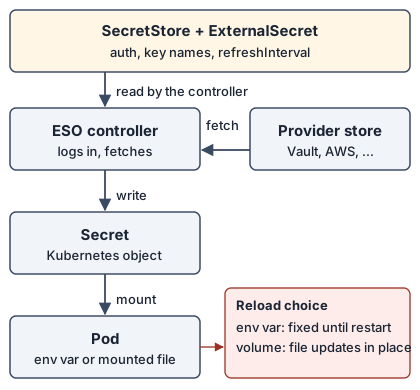
A SecretStore (or the cluster-wide ClusterSecretStore) holds the login details for a provider. An ExternalSecret names the keys to fetch, the target Secret and a refreshInterval. The controller logs in, fetches, writes the Secret, and repeats on the interval. Whatever you use to install ESO, and whatever reads the Secret afterwards, those three objects stay the same. That is why the sections below can be read separately.
Every section assumes the base install, which follows the getting-started page [15]:
helm repo add external-secrets https://charts.external-secrets.io
helm install external-secrets external-secrets/external-secrets \
  --version 2.14.0 -n external-secrets --create-namespace --wait
Pin the version. The project supports only the current minor and recommends upgrading one minor at a time [17], and it ships often: v2.11.0 on 18 September, v2.12.0 on 6 October, v2.13.0 on 16 October and v2.14.0 on 23 October 2026 [18]. Removing it needs care. In our lab, helm uninstall with a live ExternalSecret removed 24 of the 25 ESO CRDs at once, but the externalsecrets CRD stayed in Terminating because the ExternalSecret still carried the finalizer externalsecrets.external-secrets.io/externalsecret-cleanup, which only the removed controller could clear. Deleting its namespace then hung until we patched the finalizer away, after which no ESO CRD remained; the generated Secret was still present while it hung. Delete your ExternalSecret objects before you remove the operator.
Captured output: helm uninstall with a live ExternalSecret (kind-esoansible, 20:28 UTC, one run)
# helm uninstall with a live ExternalSecret, 2026-11-08T20:28:18Z, cluster kind-esoansible, ESO chart 2.14.0
$ before: CRDs, ExternalSecret, Secret
ESO CRDs: 25
NAME                                    STORETYPE            STORE   REFRESH INTERVAL   STATUS         READY   LAST SYNC
externalsecret.external-secrets.io/db   ClusterSecretStore   fake    1m                 SecretSynced   True    47s

NAME        TYPE     DATA   AGE
secret/db   Opaque   1      49m

$ helm uninstall external-secrets -n external-secrets
release "external-secrets" uninstalled

$ right after: CRDs and the ExternalSecret
externalsecrets.external-secrets.io
ESO CRDs listed: 1
deletionTimestamp=2026-11-08T20:28:19Z
ExternalSecret finalizers=["externalsecrets.external-secrets.io/externalsecret-cleanup"]
db     Opaque   1      49m

$ kubectl delete namespace demo --wait=false; then 15 s later
namespace "demo" deleted
demo   Terminating   50m

$ remove the finalizer by hand
externalsecret.external-secrets.io/db patched
Error from server (NotFound): namespaces "demo" not found
ESO CRDs listed: 0
DONE
Which setup fits
| If you… | Read | Status |
|---|---|---|
| keep secrets in HashiCorp Vault | ESO with Vault | tested |
| run the cluster from Argo CD | ESO with Argo CD | tested |
| bootstrap clusters with playbooks | ESO with Ansible | tested |
| want CI to prove your manifests apply | ESO with GitHub Actions | tested |
| need cluster secrets to reach GitHub Actions | ESO with GitHub secrets | tested |
| run Jenkins and want credentials from the cluster | ESO with Jenkins | tested |
| run Flux | ESO with Flux | docs only |
| keep secrets in AWS Secrets Manager | ESO with AWS | docs only |
| are unsure ESO is the right tool | Where ESO fits | docs only |
ESO with Vault
What it is and how it works
Vault is a secrets server. ESO logs in to it with Kubernetes authentication: the controller presents a service-account token, Vault checks that token with the TokenReview API, and Vault returns a short-lived Vault token limited by a policy. From there it reads the key-value path the ExternalSecret names. TokenReview needs the system:auth-delegator ClusterRole. The ESO docs say to bind it to “the service account that is used for authentication” [23], which is ambiguous when Vault runs in the cluster. In our setup the Vault chart bound it to Vault’s own service account (vault-server-binding), and Vault’s Kubernetes auth config had no reviewer JWT set. When we deleted that binding, a new store failed with unable to create client, and binding the role only to the ESO service account (eso-vault) did not fix it. So in this layout Vault’s account needs the binding, and ESO’s does not (capture below).
Set an audience on the Vault role: Vault warns when a role has none. The ESO docs page says Vault 1.21 and later fail without one [23], but a HashiCorp docs change merged on 30 October 2025 states that 1.21 did not make audience required [30], and on Vault 2.0.4 a role without an audience worked in our test (capture below).
You choose how ESO presents its identity. We ran three variants against the same Vault, and all three reached Valid on the store:
| Variant | How it works | What to know |
|---|---|---|
| Dedicated service account | serviceAccountRef plus audiences; ESO requests a token for that account. |
The one to start from. The chart’s ClusterRole lets the controller create tokens for service accounts. |
| Controller identity | Omit serviceAccountRef; ESO logs in with its own pod token. |
Works, but the Vault role is tied to the controller’s own identity. |
| Stored token | tokenSecretRef points at a Secret holding a Vault token. |
You own the token’s lifetime and rotation. |
Demo
This script builds the cluster, ESO, a dev-mode Vault, Kubernetes auth, a read-only policy, a role bound to one service account and one audience, and one secret; the manifests below are applied afterwards. It needs Docker, kind, kubectl and Helm on the machine, and it is for a throwaway cluster only: dev mode keeps data in memory and uses the root token root, so never copy that to a real Vault.
Script: Vault, ESO and the Vault side, from zero (vault-from-zero.sh)
# 1. Cluster, ESO and a dev-mode Vault (throwaway; dev mode keeps data in memory)
kind create cluster --name eso-demo
helm repo add external-secrets https://charts.external-secrets.io
helm repo add hashicorp https://helm.releases.hashicorp.com
helm install external-secrets external-secrets/external-secrets \
  --version 2.14.0 -n external-secrets --create-namespace --wait
helm install vault hashicorp/vault --version 0.34.1 -n vault --create-namespace \
  --set injector.enabled=false --set server.dev.enabled=true
kubectl -n vault wait --for=condition=Ready pod/vault-0 --timeout=180s

# 2. Vault side: Kubernetes auth, a read-only policy, a role bound to one service account, one secret
vx() { kubectl -n vault exec -i vault-0 -- env VAULT_ADDR=http://127.0.0.1:8200 VAULT_TOKEN=root vault "$@"; }
vx auth enable kubernetes
vx write auth/kubernetes/config kubernetes_host=https://kubernetes.default.svc.cluster.local:443
vx policy write eso-read - <<'POLICY'
path "secret/data/apps/*"     { capabilities = ["read"] }
path "secret/metadata/apps/*" { capabilities = ["read", "list"] }
POLICY
vx write auth/kubernetes/role/eso bound_service_account_names=eso-vault \
  bound_service_account_namespaces=external-secrets audience=vault \
  token_policies=eso-read token_ttl=15m
vx kv put secret/apps/shop db_user=shop db_password=first-password

# 3. Cluster side: the service account ESO will use, the namespace, then the manifests below
kubectl -n external-secrets create serviceaccount eso-vault
kubectl create namespace shop

# 4. Cleanup when you are done (lab only)
kind delete cluster --name eso-demo
Then the store and the ExternalSecret:
apiVersion: external-secrets.io/v1
kind: ClusterSecretStore
metadata: {name: vault}
spec:
  provider:
    vault:
      server: http://vault.vault.svc.cluster.local:8200
      path: secret
      version: v2
      auth:
        kubernetes:
          mountPath: kubernetes
          role: eso
          serviceAccountRef:
            name: eso-vault
            namespace: external-secrets
            audiences: [vault]
  conditions:
    - namespaces: [shop]
---
apiVersion: external-secrets.io/v1
kind: ExternalSecret
metadata: {name: shop-db, namespace: shop}
spec:
  refreshInterval: 1m
  secretStoreRef: {name: vault, kind: ClusterSecretStore}
  target: {name: shop-db}
  data:
    - {secretKey: DB_USER, remoteRef: {key: apps/shop, property: db_user}}
    - {secretKey: DB_PASSWORD, remoteRef: {key: apps/shop, property: db_password}}
The conditions block limits the store to the shop namespace. We ran the script and these manifests on a fresh cluster and deleted that cluster by hand afterwards (kind delete cluster --name eso-demo); chart 0.34.1 deploys Vault 2.0.4, the version the extras capture below prints:
Captured output: the script above plus the manifests, on a fresh cluster (kind v0.33.0, 20:01 UTC, one run; helm notes trimmed)
# Vault from zero on a fresh cluster, 2026-11-08T19:59:42Z
$ bash vault-from-zero.sh
Creating cluster "eso-demo" ...
 • Ensuring node image (kindest/node:v1.37.0) 🖼️  ...
 ✓ Ensuring node image (kindest/node:v1.37.0) 🖼️
 • Preparing nodes 📦   ...
 ✓ Preparing nodes 📦
 • Writing configuration 📜  ...
 ✓ Writing configuration 📜
 • Starting control-plane 🕹️  ...
 ✓ Starting control-plane 🕹️
 • Installing CNI 🔌  ...
 ✓ Installing CNI 🔌
 • Installing StorageClass 💾  ...
 ✓ Installing StorageClass 💾
Set kubectl context to "kind-eso-demo"
You can now use your cluster with:
kubectl cluster-info --context kind-eso-demo
Have a question, bug, or feature request? Let us know! https://kind.sigs.k8s.io/#community 🙂
"external-secrets" already exists with the same configuration, skipping
"hashicorp" already exists with the same configuration, skipping
NAME: external-secrets
TEST SUITE: None
external-secrets has been deployed successfully in namespace external-secrets!
NAME: vault
pod/vault-0 condition met
Success! Enabled kubernetes auth method at: kubernetes/
Success! Data written to: auth/kubernetes/config
Success! Uploaded policy: eso-read
Success! Data written to: auth/kubernetes/role/eso
==== Secret Path ====
secret/data/apps/shop
======= Metadata =======
Key                Value
---                -----
created_time       2026-11-08T20:01:24.01714771Z
custom_metadata    <nil>
deletion_time      n/a
destroyed          false
version            1
serviceaccount/eso-vault created
namespace/shop created

$ kubectl apply -f store-and-externalsecret.yaml   # the YAML shown in the post
clustersecretstore.external-secrets.io/vault created
externalsecret.external-secrets.io/shop-db created
$ kubectl get clustersecretstore vault; kubectl -n shop get externalsecret shop-db
NAME    AGE   STATUS   CAPABILITIES   READY
vault   25s   Valid    ReadWrite      True
NAME      STORETYPE            STORE   REFRESH INTERVAL   STATUS         READY   LAST SYNC
shop-db   ClusterSecretStore   vault   1m                 SecretSynced   True    25s
DB_USER=shop  DB_PASSWORD=first-password
$ kubectl get clusterrolebinding -o wide | grep auth-delegator
NAME                                                                    ROLE                                                                                AGE     USERS
vault-server-binding                                                    ClusterRole/system:auth-delegator                                                   62s
The lab cluster behind the rest of this guide, with a second namespace trying to use the same store:
Captured output: store, ExternalSecret and a second namespace (kind-esolab, 19:28 UTC, one run)
# Vault + ESO, captured 2026-11-08T19:28:43Z, cluster kind-esolab, ESO chart 2.14.0
$ helm list -n external-secrets
NAME            	NAMESPACE       	REVISION	UPDATED                             	STATUS  	CHART                  	APP VERSION
external-secrets	external-secrets	2       	2026-11-08 16:58:58.882435 +0000 UTC	deployed	external-secrets-2.14.0	v2.14.0

$ kubectl get clustersecretstore
NAME          AGE     STATUS                  CAPABILITIES   READY
fakec         156m    Valid                   ReadWrite      True
vault         6h1m    Valid                   ReadWrite      True
vault-podid   5h56m   Valid                   ReadWrite      True
vault-token   5h56m   InvalidProviderConfig   ReadWrite      False

$ kubectl -n shop get externalsecret shop-db
NAME      STORETYPE            STORE   REFRESH INTERVAL   STATUS         READY   LAST SYNC
shop-db   ClusterSecretStore   vault   1m                 SecretSynced   True    39s

$ kubectl -n shop get secret shop-db -o jsonpath={.data} (decoded)
DB_USER=shop
DB_PASSWORD=second-password-v2

$ kubectl -n shop get secret shop-db -o jsonpath={.metadata.ownerReferences[0].kind}
ExternalSecret

$ intruder namespace test (store has conditions: namespaces [shop])
externalsecret.external-secrets.io/steal created
NAME    STORETYPE            STORE   REFRESH INTERVAL   STATUS              READY   LAST SYNC
steal   ClusterSecretStore   vault   1m                 SecretSyncedError   False
could not get secret data from provider
The failure cases we hit while setting this up, then three follow-up experiments that test the claims above: which service account needs the review permission, what a role without an audience does, and what a revoked token looks like over three minutes:
Captured output: three failures (kind-esolab, 19:29 UTC, one run each)
# Vault auth failures, captured 2026-11-08T19:29:15Z
$ store without audiences
clustersecretstore.external-secrets.io/vault-noaud created
NAME          AGE   STATUS                  CAPABILITIES   READY
vault-noaud   10s   InvalidProviderConfig                  False
InvalidProviderConfig: unable to create client
clustersecretstore.external-secrets.io "vault-noaud" deleted

$ vault-token store (token revoked earlier in this lab)
InvalidProviderConfig: unable to validate store

$ read a path outside the Vault policy (secret/other/x)
externalsecret.external-secrets.io/outside created
NAME      STORETYPE            STORE   REFRESH INTERVAL   STATUS              READY   LAST SYNC
outside   ClusterSecretStore   vault   1m                 SecretSyncedError   False
externalsecret.external-secrets.io "outside" deleted from shop namespace
Captured output: token revocation, auth-delegator and audience experiments (kind-esolab, Vault 2.0.4, 20:29 to 20:35 UTC, one run each)
# Vault extras, 2026-11-08T20:29:23Z, cluster kind-esolab, Vault v2.0.4 (c9e9d1d4ddd4b55aae79a8949adffa9e96338720), built 2026-08-03T16:14:36Z

## C. revoke a stored Vault token and watch the store and the ExternalSecret
secret/vault-token2 created
clustersecretstore.external-secrets.io/vault-token2 created
externalsecret.external-secrets.io/c1 created
before revoke   store=Valid True es=SecretSynced True
Success! Revoked token (if it existed)
# token revoked at 20:29:49
t+15s store=Valid True es=SecretSynced True
t+30s store=Valid True es=SecretSynced True
t+45s store=Valid True es=SecretSyncedError False
t+60s store=Valid True es=SecretSyncedError False
t+76s store=Valid True es=SecretSyncedError False
t+91s store=Valid True es=SecretSyncedError False
t+106s store=Valid True es=SecretSyncedError False
t+121s store=Valid True es=SecretSyncedError False
t+136s store=Valid True es=SecretSyncedError False
t+151s store=Valid True es=SecretSyncedError False
t+166s store=Valid True es=SecretSyncedError False
t+181s store=Valid True es=SecretSyncedError False

## D. which service account needs system:auth-delegator
$ vault read auth/kubernetes/config (selected)
{'kubernetes_host': 'https://kubernetes.default.svc.cluster.local:443', 'disable_local_ca_jwt': False, 'token_reviewer_jwt_set': False}
$ auth-delegator bindings now
vault-server-binding [('ServiceAccount', 'vault', 'vault')]
clustersecretstore.external-secrets.io/d1 created
externalsecret.external-secrets.io/d1 created
with Vault SA bound       store=Valid True es=SecretSynced True
clusterrolebinding.rbac.authorization.k8s.io "vault-server-binding" deleted
# vault-server-binding deleted at 20:33:16
clustersecretstore.external-secrets.io/d2 created
externalsecret.external-secrets.io/d2 created
Vault SA unbound           store=InvalidProviderConfig  es=SecretSyncedError False
InvalidProviderConfig: unable to create client
clusterrolebinding.rbac.authorization.k8s.io/eso-vault-delegator created
clustersecretstore.external-secrets.io/d3 created
externalsecret.external-secrets.io/d3 created
only eso-vault bound        store=InvalidProviderConfig  es=SecretSyncedError False
InvalidProviderConfig: unable to create client
clusterrolebinding.rbac.authorization.k8s.io "eso-vault-delegator" deleted
clusterrolebinding.rbac.authorization.k8s.io/vault-server-binding created
# vault-server-binding restored at 20:34:17

## E. a Vault role without an audience on Vault v2.0.4
WARNING! The following warnings were returned from Vault:

  * Role eso-noaud does not have an audience configured. While audiences are
  not required, consider specifying one if your use case would benefit from
  additional JWT claim verification.

clustersecretstore.external-secrets.io/e1 created
externalsecret.external-secrets.io/e1 created
role without audience, token with default audience store=Valid True es=SecretSynced True
Valid: store validated
clustersecretstore.external-secrets.io/e2 created
externalsecret.external-secrets.io/e2 created
role without audience, token with audience vault store=Valid True es=SecretSynced True
DONE
Pros and cons
Pros
- Vault’s policy bounds what ESO can read. A path outside
apps/failed withSecretSyncedError, whatever theExternalSecretasked for. - With the dedicated service account there is no static credential in the cluster to rotate.
conditionson aClusterSecretStorestopped a second namespace from reading the first one’s path. The CRD also listsnamespaceRegexesand anamespaceSelector; we ran onlynamespaces. The project’s multi-tenancy guide covers the wider layouts [24].
Cons
- Three pieces must agree: the service-account name, the audience and the Vault role. Removing
audiencesfrom the store while the role demanded audiencevaultgaveInvalidProviderConfig: unable to create client, which does not say what is missing. - Different failures read alike. A namespace blocked by
conditionsand a path denied by the Vault policy both ended incould not get secret data from provider. - A stored token that Vault revokes does not fail loudly. After we revoked one, the
ExternalSecreterrored between our 30 s and 45 s samples, while the store printedValidat every sample for the next three minutes. The older lab store whose token was revoked hours earlier showedInvalidProviderConfigin the first failure capture.
ESO with Argo CD
What it is and how it works
Argo CD installs the ESO chart as an Application, and the same Argo CD can manage your stores and ExternalSecret objects from Git. Only the ExternalSecret lives in Git; the Secret it creates appears as a child in the resource tree but is not in the repository, so no secret value is committed. Argo CD 3.6.1 ships a health check for ExternalSecret that reports Degraded when the Ready condition is false [20], so a broken secret shows up in the application’s health.
The ESO CRDs have reached the 256 KB annotation limit, so client-side apply cannot install them; the getting-started page says to use server-side apply everywhere [15]. ESO’s own end-to-end Argo CD test sets ServerSideApply=true for that reason [19].
Demo
apiVersion: argoproj.io/v1alpha1
kind: Application
metadata: {name: eso, namespace: argocd}
spec:
  project: default
  source:
    repoURL: https://charts.external-secrets.io
    chart: external-secrets
    targetRevision: 2.14.0
  destination: {server: https://kubernetes.default.svc, namespace: external-secrets}
  syncPolicy:
    automated: {prune: true, selfHeal: true}
    syncOptions: [CreateNamespace=true, ServerSideApply=true]
A second Application synced a namespace, a store and an ExternalSecret from a Git repository (the lab served it from a git daemon inside the cluster). Both applications, then the second one after we committed a remoteRef that points at a missing key:
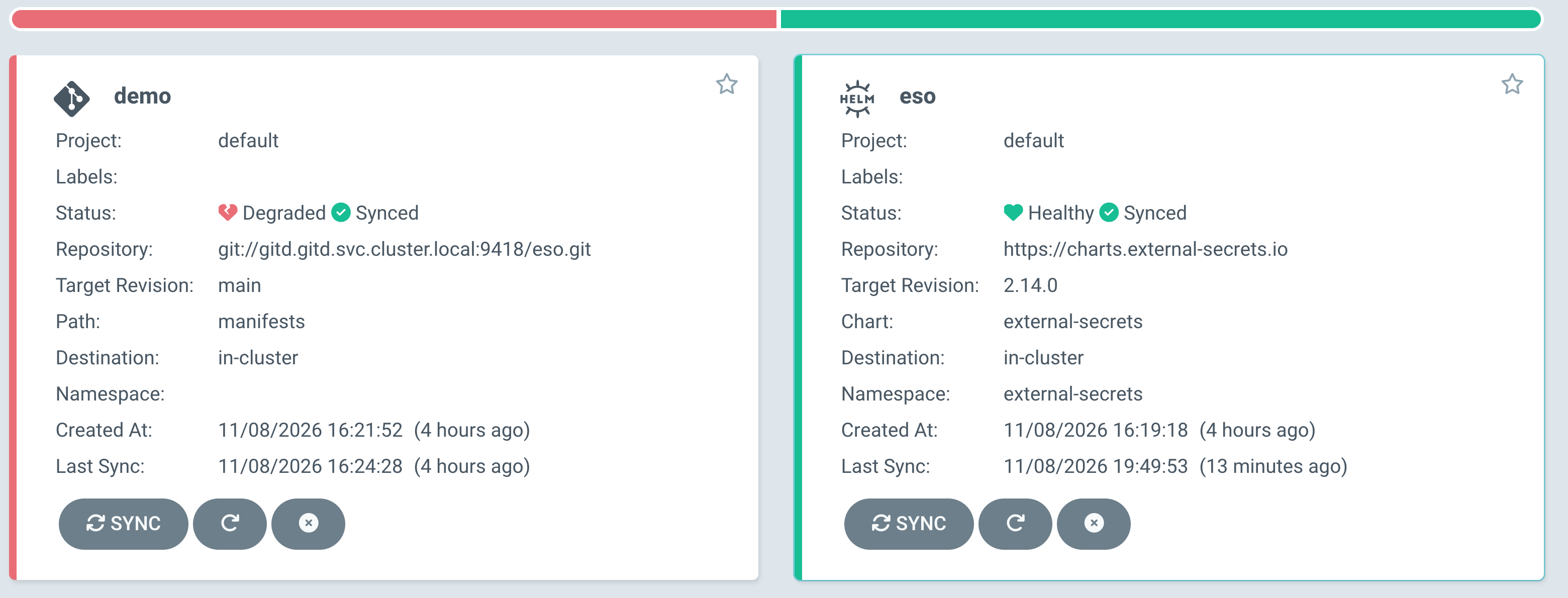
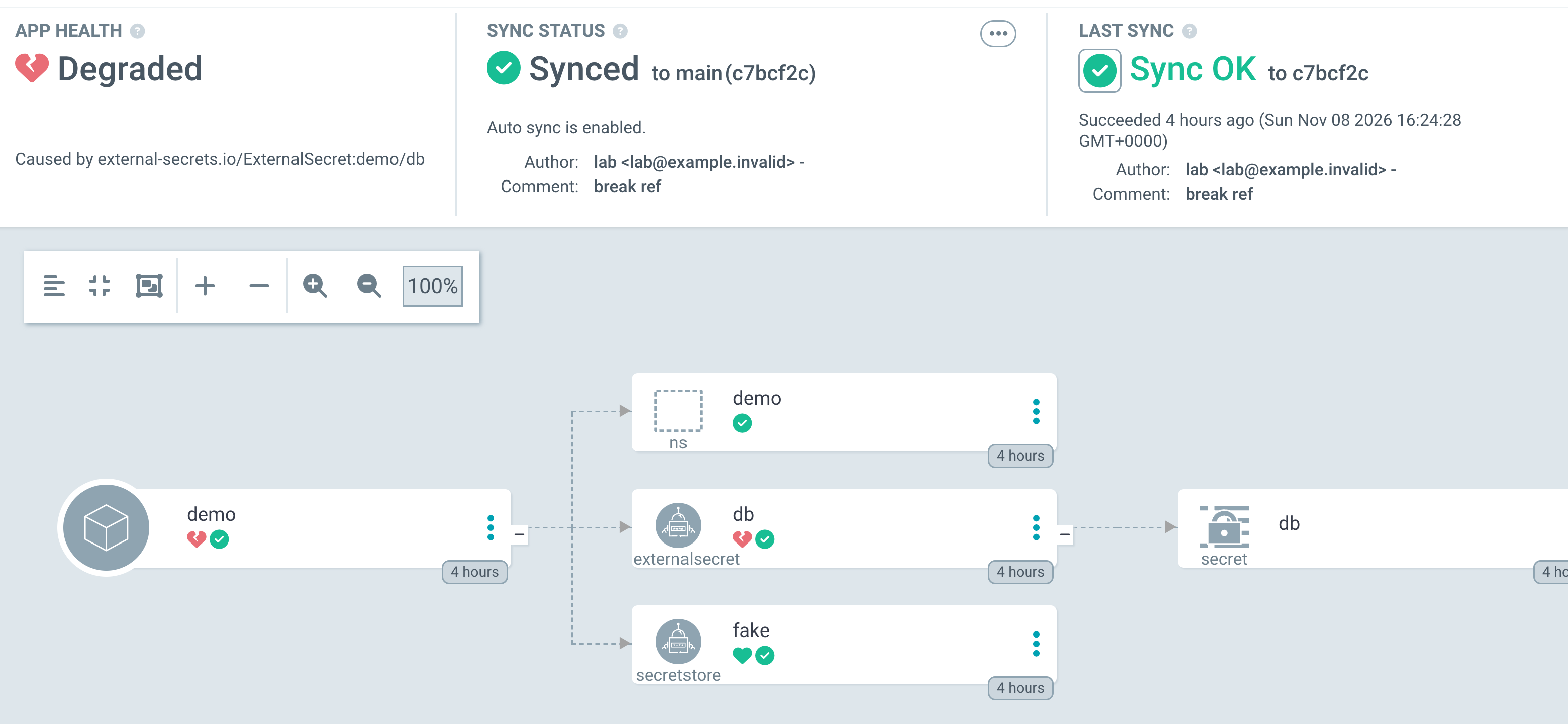
Without ServerSideApply=true, the same chart fails. The capture below installs the chart a second time as another release, so the CRDs already exist, then adds the option to the failing Application, then deletes and recreates it with the option set:
Captured output: a failing Application, the option added live, then recreated (Argo CD 3.6.1, second release on a cluster whose CRDs already existed, 20:28 UTC, one run)
# Argo CD: add ServerSideApply to an Application that is already failing, 2026-11-08T20:28:18Z, Argo CD 3.6.1
$ kubectl apply -f eso-nosa.yaml   # no ServerSideApply, second release, CRDs already exist
application.argoproj.io/eso-nosa created
# +70s
NAME       SYNC STATUS   HEALTH STATUS
eso-nosa   OutOfSync     Healthy
eso        OutOfSync     Healthy
Running: one or more synchronization tasks completed unsuccessfully, reason: error when patching "/dev/shm/2662521763": CustomResourceDefinition.apiextensions.k8s.io "secretstores.external-secrets.io" is invalid: metadata.annotations: Too long: may not be more than 262144 bytes,error when patching "/dev/shm/2450622984": CustomResourceDefinition.apiextensions.k8s.io "clustersecretstores.external-secrets.io" is invalid

$ kubectl patch app eso-nosa: add ServerSideApply=true to syncOptions
application.argoproj.io/eso-nosa patched
syncOptions=["CreateNamespace=true","ServerSideApply=true"]
# +60s after the patch
NAME       SYNC STATUS   HEALTH STATUS
eso-nosa   Synced        Healthy
eso        OutOfSync     Healthy
Running: one or more synchronization tasks completed unsuccessfully, reason: error when patching "/dev/shm/1576417721": CustomResourceDefinition.apiextensions.k8s.io "secretstores.external-secrets.io" is invalid: metadata.annotations: Too long: may not be more than 262144 bytes,error when patching "
# +120s after the patch
NAME       SYNC STATUS   HEALTH STATUS
eso-nosa   OutOfSync     Healthy
eso        OutOfSync     Healthy
Running: one or more synchronization tasks completed unsuccessfully, reason: error when patching "/dev/shm/2036302684": CustomResourceDefinition.apiextensions.k8s.io "clustersecretstores.external-secrets.io" is invalid: metadata.annotations: Too long: may not be more than 262144 bytes,error when pat
# +180s after the patch
NAME       SYNC STATUS   HEALTH STATUS
eso-nosa   OutOfSync     Healthy
eso        OutOfSync     Healthy
Running: one or more synchronization tasks completed unsuccessfully, reason: error when patching "/dev/shm/2036302684": CustomResourceDefinition.apiextensions.k8s.io "clustersecretstores.external-secrets.io" is invalid: metadata.annotations: Too long: may not be more than 262144 bytes,error when pat

$ delete the Application and apply it again with the option set from the start
application.argoproj.io "eso-nosa" deleted from argocd namespace
application.argoproj.io/eso-nosa created
NAME       SYNC STATUS   HEALTH STATUS
eso-nosa   OutOfSync     Healthy
eso        OutOfSync     Healthy
Succeeded: successfully synced (all tasks run)
DONE
Captured output: Argo CD applications after the cleanup (kind-esoargo, one run)
# Argo CD applications after the second release was deleted and eso was re-synced, captured 2026-11-08T20:48:52Z, cluster kind-esoargo
NAME   SYNC STATUS   HEALTH STATUS
demo   Synced        Degraded
eso    Synced        Healthy
Pros and cons
Pros
- One tool installs ESO and the stores, and the application’s health carries a broken
ExternalSecret(the second screenshot). - Nothing secret is in Git: only the
ExternalSecretthat says where to fetch it.
Cons
- You must set
ServerSideApply=truebefore the first sync. When we added it to a liveApplicationthat was already failing, the operation message stayed the same in every sample over the next three minutes, although the sync status showed Synced in one sample at 60 seconds and then went back to OutOfSync. Deleting theApplicationand creating it again with the option made the operation succeed; on the clean cluster behind the screenshots, the application created that way shows Healthy and Synced (first screenshot). We did not find out why the running operation kept its old options. - ESO’s CRDs must exist before any
ExternalSecretthat Argo CD applies. We did not test ordering, so check Argo CD’s sync-waves documentation for your layout [29]. - Two
Applications that share the chart’s cluster-scoped objects can fight. The throwaway second release in the capture above made the healthyesoapplication OutOfSync in every sample, and the recreated one stayed OutOfSync too. After we deleted the second release and re-synced,esowent back to Synced and Healthy (last block below).
ESO with Ansible
What it is and how it works
The kubernetes.core.helm module installs the chart from a playbook, and kubernetes.core.k8s applies the store and ExternalSecret objects. This suits teams that already bootstrap clusters with playbooks. The host running Ansible needs the Helm binary and the kubernetes Python package.
Demo
- name: Install the chart (CRDs included)
  kubernetes.core.helm:
    kube_context: kind-esoansible
    name: external-secrets
    chart_ref: external-secrets/external-secrets
    chart_version: "2.14.0"
    release_namespace: external-secrets
    create_namespace: true
    wait: true
    timeout: 5m
Before it, a helm_repository task adds the chart repository; after it, three kubernetes.core.k8s tasks apply a fake-provider ClusterSecretStore, a namespace and an ExternalSecret, and a final task waits for Ready. The whole playbook:
Playbook: eso.yml
- name: Install External Secrets Operator and one fake-provider secret
  hosts: localhost
  connection: local
  gather_facts: false
  vars:
    kube_context: kind-esoansible
    eso_chart_version: "2.14.0"
  tasks:
    - name: Add the ESO chart repository
      kubernetes.core.helm_repository:
        name: external-secrets
        repo_url: https://charts.external-secrets.io

    - name: Install the chart (CRDs included)
      kubernetes.core.helm:
        kube_context: "{{ kube_context }}"
        name: external-secrets
        chart_ref: external-secrets/external-secrets
        chart_version: "{{ eso_chart_version }}"
        release_namespace: external-secrets
        create_namespace: true
        wait: true
        timeout: 5m

    - name: Store backed by the fake provider
      kubernetes.core.k8s:
        context: "{{ kube_context }}"
        state: present
        definition:
          apiVersion: external-secrets.io/v1
          kind: ClusterSecretStore
          metadata: {name: fake}
          spec:
            provider:
              fake:
                data:
                  - {key: /demo/db, value: s3cr3t-from-ansible}

    - name: Namespace for the app
      kubernetes.core.k8s:
        context: "{{ kube_context }}"
        state: present
        definition: {apiVersion: v1, kind: Namespace, metadata: {name: demo}}

    - name: ExternalSecret
      kubernetes.core.k8s:
        context: "{{ kube_context }}"
        state: present
        definition:
          apiVersion: external-secrets.io/v1
          kind: ExternalSecret
          metadata: {name: db, namespace: demo}
          spec:
            refreshInterval: 1m
            secretStoreRef: {kind: ClusterSecretStore, name: fake}
            target: {name: db}
            data:
              - secretKey: password
                remoteRef: {key: /demo/db}

    - name: Wait until the ExternalSecret is Ready
      kubernetes.core.k8s_info:
        context: "{{ kube_context }}"
        api_version: external-secrets.io/v1
        kind: ExternalSecret
        namespace: demo
        name: db
      register: es
      until: es.resources | length > 0 and (es.resources[0].status.conditions | default([]) | selectattr('type','equalto','Ready') | selectattr('status','equalto','True') | list | length) > 0
      retries: 12
      delay: 5
Run it with ansible-playbook eso.yml after kind create cluster --name esoansible, ansible-galaxy collection install kubernetes.core and pip install kubernetes. We ran it on a cluster with ESO uninstalled, then a second time:
Captured output: two playbook runs (kind-esoansible, ansible-core 2.22.0, kubernetes.core 6.6.0, 19:38 UTC)
# Ansible + ESO, captured 2026-11-08T19:38:06Z, cluster kind-esoansible (ESO uninstalled beforehand)
$ ansible --version | head -1
ansible [core 2.22.0]
$ ansible-galaxy collection list kubernetes.core
--------------- -------
kubernetes.core 6.6.0

$ ansible-playbook eso.yml   # run 1
PLAY [Install External Secrets Operator and one fake-provider secret] **********
TASK [Add the ESO chart repository] ********************************************
ok: [localhost]
TASK [Install the chart (CRDs included)] ***************************************
[DEPRECATION WARNING]: The 'status.values' return value is deprecated and will be removed in version 8.0.0. Use 'status.release_values' instead. This feature will be removed from collection 'kubernetes.core' version 8.0.0.
changed: [localhost]
TASK [Store backed by the fake provider] ***************************************
[WARNING]: store fake isn't currently maintained. Please plan and prepare accordingly.
[DEPRECATION WARNING]: Passing `warnings` to `exit_json` or `fail_json` is deprecated. This feature will be removed from ansible-core version 2.23. Use `AnsibleModule.warn` instead.
changed: [localhost]
TASK [Namespace for the app] ***************************************************
changed: [localhost]
TASK [ExternalSecret] **********************************************************
changed: [localhost]
TASK [Wait until the ExternalSecret is Ready] **********************************
ok: [localhost]
PLAY RECAP *********************************************************************
localhost                  : ok=6    changed=4    unreachable=0    failed=0    skipped=0    rescued=0    ignored=0

$ ansible-playbook eso.yml   # run 2
TASK [Wait until the ExternalSecret is Ready] **********************************
ok: [localhost]
PLAY RECAP *********************************************************************
localhost                  : ok=6    changed=0    unreachable=0    failed=0    skipped=0    rescued=0    ignored=0

$ kubectl -n demo get externalsecret db
NAME   STORETYPE            STORE   REFRESH INTERVAL   STATUS         READY   LAST SYNC
db     ClusterSecretStore   fake    1m                 SecretSynced   True    4s
password=s3cr3t-from-ansible
Pros and cons
Pros
- Idempotent: the second run reported
changed=0. - Changing
chart_versionwas detected aschanged=1in an earlier run, even though the module warns that idempotency needs thehelm diffplugin [21]. That test moved the chart from 2.14.0 down to 2.13.0 and back, only to see detection; real upgrades go one minor at a time. - One playbook covers the operator and its first secret, and it runs without Argo CD or Flux.
Cons
- The control host needs Helm and the Python client, and the module prints deprecation notices in collection 6.6.0:
wait_timeoutis deprecated in favour oftimeout, and the run above printed a notice about thestatus.valuesreturn value [21]. - Playbooks apply once; nothing watches for drift between runs. Argo CD does that.
- Ansible has no view of the
ExternalSecrethealth after the wait task, so you need another check for later breakage. - One run of a back-to-back chart version change ended with
failed=1. Two reruns passed, and we did not capture the error text, so we cannot say why it failed.
ESO with GitHub Actions
What it is and how it works
Here ESO is not the thing you install in production. A workflow_dispatch or pull-request job starts a kind cluster, installs the chart at a pinned version, applies your store and ExternalSecret manifests and waits for Ready. If it fails, your manifests would not reconcile.
Demo
The workflow file, .github/workflows/eso.yml:
Workflow: .github/workflows/eso.yml
name: install-eso
on: workflow_dispatch
jobs:
  eso:
    runs-on: ubuntu-latest
    env:
      ESO_CHART_VERSION: "2.14.0"
    steps:
      - uses: actions/[email protected]
      - uses: helm/[email protected]
        with:
          cluster_name: ci
      - name: Install External Secrets Operator
        run: |
          helm repo add external-secrets https://charts.external-secrets.io
          helm install external-secrets external-secrets/external-secrets \
            --version "$ESO_CHART_VERSION" -n external-secrets --create-namespace --wait --timeout 5m
      - name: Apply a fake-provider store and an ExternalSecret
        run: |
          kubectl apply -f manifests/
          kubectl -n demo wait --for=condition=Ready externalsecret/db --timeout=120s
      - name: Check the generated Secret
        run: |
          test "$(kubectl -n demo get secret db -o jsonpath='{.data.password}' | base64 -d)" = "s3cr3t-from-actions"
          kubectl get crd externalsecrets.external-secrets.io -o jsonpath='{range .spec.versions[*]}{.name} served={.served}{"\n"}{end}'
The manifests/ folder it applies holds two files:
manifests/10-store.yaml
apiVersion: external-secrets.io/v1
kind: ClusterSecretStore
metadata: {name: fake}
spec:
  provider:
    fake:
      data:
        - {key: /demo/db, value: s3cr3t-from-actions}
manifests/20-app.yaml
apiVersion: v1
kind: Namespace
metadata: {name: demo}
---
apiVersion: external-secrets.io/v1
kind: ExternalSecret
metadata: {name: db, namespace: demo}
spec:
  refreshInterval: 1m
  secretStoreRef: {kind: ClusterSecretStore, name: fake}
  target: {name: db}
  data:
    - secretKey: password
      remoteRef: {key: /demo/db}
The run that executed this job, as GitHub reports it (the repository is private, so the page itself is not linked):
Captured output: the GitHub Actions run, assembled from three captures of the same run: the `gh run view` summary, the step results and the log lines of its last steps
$ GitHub Actions run (ESO install in kind)
✓ main install-eso · 42491820574
Triggered via workflow_dispatch about 4 hours ago
JOBS
✓ eso in 2m26s (ID 128765654030)

$ gh run view 42491820574 --json jobs   (steps)
2 Run actions/[email protected]: success
3 Run helm/[email protected]: success
4 Install External Secrets Operator: success
5 Apply a fake-provider store and an ExternalSecret: success
6 Check the generated Secret: success

$ gh run view 42491820574 --log   (output lines of the last two steps)
clustersecretstore.external-secrets.io/fake created
namespace/demo created
externalsecret.external-secrets.io/db created
externalsecret.external-secrets.io/db condition met
v1 served=true
v1beta1 served=false
Pros and cons
Pros
- Every change to your manifests is tested against the same pinned chart version in about 2.5 minutes.
- No cloud account or Vault is needed in the job.
Cons
- It proves your YAML and the CRD schema, not your provider. The job used a fake store, so a wrong Vault role or audience would pass here and fail in the cluster.
- A fake store prints the maintenance warning described earlier.
ESO with GitHub secrets
What it is and how it works
This is the opposite direction. The GitHub provider is write-only: a PushSecret writes a Kubernetes Secret out to GitHub Actions or Dependabot secrets, and ESO cannot read from GitHub [27]. It authenticates as a GitHub App with an App ID, an installation ID and a private key, and the App needs the Secrets read and write permission. Use it when a value is created or rotated in the cluster and a pipeline needs the same value.
Creating the App is a browser task in GitHub’s settings:
- Open Settings, Developer settings, GitHub Apps, New GitHub App. Give it a name and any homepage URL, and untick Webhook, Active.
- Under repository permissions set Secrets to Read and write. Leave everything else at no access, and choose to allow installation only on your own account.
- After creating it, copy the App ID and use Generate a private key to download the
.pemfile. - Choose Install App, pick Only select repositories and the target repository. The installation ID is the number at the end of the installation page’s URL (
.../installations/<id>).
Then create the namespace, the key and the source Secret in the cluster:
kubectl create namespace ghpush
kubectl -n ghpush create secret generic github-app-private-key --from-file=privateKey.pem=./app.pem
kubectl -n ghpush create secret generic app-config --from-literal=value=pushed-v3
Demo
apiVersion: external-secrets.io/v1
kind: SecretStore
metadata: {name: github, namespace: ghpush}
spec:
  provider:
    github:
      appID: 123456            # placeholder
      installationID: 7654321  # placeholder
      organization: your-account
      repository: your-repo
      auth:
        privateKey: {name: github-app-private-key, key: privateKey.pem}
---
apiVersion: external-secrets.io/v1alpha1
kind: PushSecret
metadata: {name: to-github, namespace: ghpush}
spec:
  deletionPolicy: Delete
  refreshInterval: 1m
  secretStoreRefs: [{name: github, kind: SecretStore}]
  selector: {secret: {name: app-config}}
  data:
    - match: {secretKey: value, remoteRef: {remoteKey: ESO_LAB_PUSHED}}
We created the PushSecret, changed the source value, then deleted the PushSecret, listing the repository’s Actions secrets through GitHub’s API each time. GitHub never returns secret values, so the listing shows the name and updated_at. To prove the value itself arrived, a workflow step compared the pushed secret with the expected value and printed only whether they matched:
- env:
    PUSHED: ${{ secrets.ESO_LAB_PUSHED }}
  run: |
    if [ "$PUSHED" = "pushed-v3" ]; then echo "match=true length=${#PUSHED}"; else echo "match=false length=${#PUSHED}"; exit 1; fi
Captured output: PushSecret create, change and delete, then the workflow check (19:38 to 19:41 UTC, one run)
# GitHub provider (PushSecret to Actions secrets), captured 2026-11-08T19:38:44Z, cluster kind-esolab
$ kubectl -n ghpush get secretstore github
NAME     AGE     STATUS   CAPABILITIES   READY
github   3h44m   Valid    WriteOnly      True

$ GET /repos/<owner>/<repo>/actions/secrets   # before
[]

$ kubectl apply -f pushsecret.yaml
pushsecret.external-secrets.io/to-github created
NAME        AGE   STATUS   LAST SYNC
to-github   25s   Synced   23s

$ GET actions/secrets   # after PushSecret
[{"name":"ESO_LAB_PUSHED","updated_at":"2026-11-08T19:38:49Z"}]

$ change source Secret value, wait one refresh
secret/app-config configured
$ GET actions/secrets   # after source change
[{"name":"ESO_LAB_PUSHED","updated_at":"2026-11-08T19:39:49Z"}]

$ kubectl delete pushsecret to-github  (deletionPolicy: Delete)
pushsecret.external-secrets.io "to-github" deleted from ghpush namespace
$ GET actions/secrets   # after delete
[]


$ kubectl apply -f pushsecret.yaml   # recreated before the workflow run (terminal output copied at 19:41 UTC)
pushsecret.external-secrets.io/to-github created
NAME        AGE   STATUS   LAST SYNC
to-github   25s   Synced   23s

# End-to-end: workflow reads the secret ESO pushed, captured 2026-11-08T19:42:18Z
$ gh run view --log   (the step's output line, and the run result)
match=true length=9
{"conclusion":"success","createdAt":"2026-11-08T19:41:27Z","jobs":[{"conclusion":"success","name":"check"}]}
Pros and cons
Pros
- A change in the cluster reaches the Actions secret on the next refresh, and deleting the
PushSecretremoves the remote secret whendeletionPolicyisDelete. - The end-to-end check passed: the workflow read the pushed value and
match=true.
Cons
- You must create and install a GitHub App first, through the browser steps above.
- The docs snippet quotes
appIDandinstallationIDas strings. The 2.14.0 CRD rejects that with “must be of type integer”, so use plain numbers. - The docs list
organizationas required. We set it to a personal account name and setrepository, and that was accepted for a repository secret; we did not test organization-level secrets. - Apply the
SecretStorebefore thePushSecret. Ours was applied first and loggedcould not get SecretStore "github"until the store existed. - The provider is listed as alpha [17].
ESO with Jenkins
What it is and how it works
The Kubernetes Credentials Provider plugin turns Kubernetes Secret objects that carry a jenkins.io/credentials-type label into Jenkins credentials [26]. ESO creates those Secret objects, so Jenkins gets credentials from your secret store without anyone typing them into Jenkins. The plugin needs get, list and watch on secrets for the Jenkins service account, and a namespaced Role was enough.
Demo
The ExternalSecret carries the label and the description in its template. This lab used a fake store to keep the focus on Jenkins:
SecretStore and ExternalSecret (es.yaml)
apiVersion: external-secrets.io/v1
kind: SecretStore
metadata: {name: fake, namespace: ci}
spec:
  provider:
    fake:
      data:
        - {key: /ci/sonar-token, value: tok-v3}
---
apiVersion: external-secrets.io/v1
kind: ExternalSecret
metadata: {name: sonar-token, namespace: ci}
spec:
  refreshInterval: 1m
  secretStoreRef: {name: fake, kind: SecretStore}
  target:
    name: sonar-token
    template:
      metadata:
        labels:
          jenkins.io/credentials-type: secretText
        annotations:
          jenkins.io/credentials-description: "sonar token synced by ESO"
  data:
    - secretKey: text
      remoteRef: {key: /ci/sonar-token}
Jenkins itself runs as a Deployment, with the image and both plugins pinned to the versions we ran, whose service account may read secrets in its own namespace:
Namespace, ServiceAccount, Role, RoleBinding and Deployment (jenkins.yaml)
apiVersion: v1
kind: Namespace
metadata: {name: ci}
---
apiVersion: v1
kind: ServiceAccount
metadata: {name: jenkins, namespace: ci}
---
apiVersion: rbac.authorization.k8s.io/v1
kind: Role
metadata: {name: jenkins-secrets-reader, namespace: ci}
rules:
  - apiGroups: [""]
    resources: [secrets]
    verbs: [get, list, watch]
---
apiVersion: rbac.authorization.k8s.io/v1
kind: RoleBinding
metadata: {name: jenkins-secrets-reader, namespace: ci}
roleRef: {apiGroup: rbac.authorization.k8s.io, kind: Role, name: jenkins-secrets-reader}
subjects: [{kind: ServiceAccount, name: jenkins, namespace: ci}]
---
apiVersion: apps/v1
kind: Deployment
metadata: {name: jenkins, namespace: ci}
spec:
  replicas: 1
  selector: {matchLabels: {app: jenkins}}
  template:
    metadata: {labels: {app: jenkins}}
    spec:
      serviceAccountName: jenkins
      containers:
        - name: jenkins
          image: jenkins/jenkins:2.580.2-lts-jdk21
          command: ["sh","-c","jenkins-plugin-cli --plugins kubernetes-credentials-provider:1.324.v5271cd145cb_1 plain-credentials:199.v9f8e1f741799 && exec /usr/bin/tini -- /usr/local/bin/jenkins.sh"]
          env:
            - {name: JAVA_OPTS, value: "-Djenkins.install.runSetupWizard=false"}
          ports: [{containerPort: 8080}]
The credential as Jenkins lists it, and the capture behind it:

Captured output: pinned image and plugins, credential, deletion and recreation (kind-esolab, 20:37 UTC, one run)
# Jenkins + ESO with pinned image and plugins, captured 2026-11-08T20:37:22Z, cluster kind-esolab
$ image and Jenkins version
jenkins/jenkins:2.580.2-lts-jdk21
X-Jenkins: 2.580.2
$ plugins
[('credentials', '1514.vb_01eb_014e7d4'), ('kubernetes-credentials-provider', '1.324.v5271cd145cb_1'), ('plain-credentials', '199.v9f8e1f741799')]
$ ExternalSecret and Secret
NAME          STORETYPE     STORE   REFRESH INTERVAL   STATUS         READY   LAST SYNC
sonar-token   SecretStore   fake    1m                 SecretSynced   True    17s
NAME          TYPE     DATA   AGE   LABELS
sonar-token   Opaque   1      54m   jenkins.io/credentials-type=secretText,reconcile.external-secrets.io/creat
$ credential in Jenkins
[{'id': 'sonar-token', 'description': 'sonar token synced by ESO', 'typeName': 'Secret text'}]
value Jenkins resolves: tok-v3

$ kubectl -n ci delete externalsecret sonar-token
externalsecret.external-secrets.io "sonar-token" deleted from ci namespace
after 5 s: secret=Error from server (NotFound): secrets "sonar-token" not foun | jenkins=[]
after 15 s (5 + 10): secret=Error from server (NotFound): secrets "sonar-token" not foun | jenkins=[]
after 35 s (5 + 10 + 20): secret=Error from server (NotFound): secrets "sonar-token" not foun | jenkins=[]

$ recreate it
externalsecret.external-secrets.io/sonar-token created
jenkins=[{'id': 'sonar-token', 'description': 'sonar token synced by ESO', 'typeName': 'Secret text'}]
Pros and cons
Pros
- No secret is typed into Jenkins or stored in its configuration. Rotating the source changes the credential: in an earlier run both the
Secretand the value Jenkins resolved moved to the new value, and deleting theExternalSecretremoved the credential by the first check, five seconds later, in the pinned run captured below. - The
ExternalSecrettemplate carries the label and description, so one manifest defines the whole credential.
Cons
- With only the Kubernetes Credentials Provider installed, Jenkins logged
No SecretToCredentialConverter found to convert secrets of type secretTextand listed nothing. Theplain-credentialsplugin supplies the converter; the capture above shows it installed. - Jenkins decides who can read a credential’s value. Our lab Jenkins ran with security off, which is why the script console in the capture returned the value; do not copy that part.
ESO with Flux and with AWS (docs only)
We did not run these two. The project documents Flux with an example that installs ESO and reconciles ExternalSecret objects from a Git repository [16], and documents AWS Secrets Manager with several ways to authenticate: the controller’s pod identity, access keys, an EKS service account (IRSA), an assumed role and EKS Pod Identity [22]. If you pick either, treat the Vault, Argo CD and delivery sections here as the pattern, and check the linked pages for your version.
What every setup shares
Delivery options
Three ExternalSecret features change what lands in the cluster, independent of the setups above:
Captured output: template, ClusterExternalSecret and ConfigMap target (kind-esolab, 19:43 UTC, one run)
# Delivery features, captured 2026-11-08T19:43:29Z, cluster kind-esolab
$ template: kubectl -n tpl get secret dsn -o jsonpath={.data.DATABASE_URL}
postgres://appuser:[email protected]:5432/app

$ ClusterExternalSecret fanout: provisioned namespaces
["teamb","tpl"]
$ namespace teamc labelled team=b:
Error from server (NotFound): secrets "team-pass" not found
$ relabel teamc team=a at 19:43:49
t+15: team-pass   Opaque   1      15s
t+30: team-pass   Opaque   1      30s
t+45: team-pass   Opaque   1      45s

$ target.manifest ConfigMap
NAME         STORETYPE            STORE   REFRESH INTERVAL   STATUS           READY   LAST SYNC
app-config   ClusterSecretStore   fakec   1m                 ResourceSynced   True    42s
{"LOG_USER":"appuser"}
configmap/app-config patched
after 4s: appuser- Templates.
target.templatebuilt a connection string from two fetched values [25]. - ClusterExternalSecret. One object created an
ExternalSecretin every namespace whose labels match a selector. A namespace labelledteam=bgot nothing; after relabelling toteam=a, theSecretexisted at our first check, 15 seconds later. - target.manifest. An
ExternalSecretcan write a ConfigMap or a custom resource instead of aSecret. The project calls this “heavy alpha” and warns that custom resources are not encrypted at rest [28]. Without the controller flag, theExternalSecreterrored withgeneric targets are disabled. Enable with --unsafe-allow-generic-targets flag; the chart valuegenericTargets.enabled=trueadds the flag and the ConfigMap permissions, and the ConfigMap then synced. A manual edit was reverted by our check four seconds later. For other kinds, the chart’s values comment and template readgenericTargets.resources[].apiGroup(singular), while the docs page writesapiGroups; with the plural key,helm templaterendered no rule forargoproj.io. We did not test a live custom resource.
What a pod sees after a change
The Secret updates when the controller reconciles. What a pod sees depends on how it consumes the Secret. One pod read the same value as an environment variable and as a mounted file while we changed the source:
Captured output: env var and mounted file after the source changed (kind-esolab, 19:44 UTC, one run)
# Reload behaviour, captured 2026-11-08T19:44:57Z, cluster kind-esolab, ESO refreshInterval 1m
$ pod reads the same Secret as env var PASS_ENV and as file /etc/s/pass
start       secret=pw-v2 env=pw-v2 file=pw-v2
# source changed pw-v2 -> pw-v3 at 19:44:57
t+20s secret=pw-v3 env=pw-v2 file=pw-v3
t+40s secret=pw-v3 env=pw-v2 file=pw-v3
t+61s secret=pw-v3 env=pw-v2 file=pw-v3
t+81s secret=pw-v3 env=pw-v2 file=pw-v3
t+101s secret=pw-v3 env=pw-v2 file=pw-v3
t+122s secret=pw-v3 env=pw-v2 file=pw-v3
t+142s secret=pw-v3 env=pw-v2 file=pw-v3
t+162s secret=pw-v3 env=pw-v2 file=pw-v3
$ kubectl -n tpl rollout restart deploy/app
deployment.apps/app restarted
deployment "app" successfully rolled out
NAME                   READY   STATUS        RESTARTS      AGE
app-65698cf79f-ltvwd   1/1     Running       0             16s
app-849847f7d9-4wl4x   1/1     Terminating   2 (22m ago)   170m
new pod     secret=pw-v3 env=pw-v3 file=pw-v3
Captured output: the earlier reload run (same day, terminal output copied)
# Reload behaviour, earlier run the same day (same pod spec, same 1m refreshInterval); terminal output copied from the session
$ pod reads the same Secret as env var PASS_ENV and as file /etc/s/pass
start secret=pw-v1 env=pw-v1 file=pw-v1
# source changed pw-v1 -> pw-v2
t+20s secret=pw-v2 env=pw-v1 file=pw-v1
t+40s secret=pw-v2 env=pw-v1 file=pw-v1
t+61s secret=pw-v2 env=pw-v1 file=pw-v1
t+81s secret=pw-v2 env=pw-v1 file=pw-v2
t+101s secret=pw-v2 env=pw-v1 file=pw-v2
t+121s secret=pw-v2 env=pw-v1 file=pw-v2
t+142s secret=pw-v2 env=pw-v1 file=pw-v2
t+162s secret=pw-v2 env=pw-v1 file=pw-v2
An environment variable stays at its old value until the pod restarts, so use a rollout or a controller such as Reloader. A mounted file updates in place, and the application must re-read it. In this run the file matched the Secret at the first check; in an earlier run it lagged for between 61 and 81 seconds, so do not plan around a figure. The earlier run’s raw lines are in the second block above. One trap in our own check: right after rollout restart, the old pod was still Terminating, and reading the first pod in the list showed the old value. Select the newest pod.
When the store is unreachable
We pointed the Vault store at a closed port, then restored it:
Captured output: store pointed at a closed port, then restored (kind-esolab, 19:48 UTC, one run)
# Store outage, captured 2026-11-08T19:48:28Z, cluster kind-esolab, ExternalSecret refreshInterval 1m
# outage simulated by pointing the ClusterSecretStore at a closed port (:9999)
before     ES: shop-db   ClusterSecretStore   vault   1m    SecretSynced   True   23s | store: vault   6h20m   Valid   ReadWrite   True | secret DB_USER=shop
clustersecretstore.external-secrets.io/vault patched
# bad address applied at 19:48:28
t+20s ES: shop-db   ClusterSecretStore   vault   1m    SecretSynced   True   43s | store: vault   6h21m   Valid   ReadWrite   True | secret DB_USER=shop
t+41s ES: shop-db   ClusterSecretStore   vault   1m    SecretSynced   True   64s | store: vault   6h21m   Valid   ReadWrite   True | secret DB_USER=shop
t+61s ES: shop-db   ClusterSecretStore   vault   1m    SecretSynced   True   84s | store: vault   6h21m   InvalidProviderConfig   ReadWrite   False | secret DB_USER=shop
t+81s ES: shop-db   ClusterSecretStore   vault   1m    SecretSynced   True   104s | store: vault   6h22m   InvalidProviderConfig   ReadWrite   False | secret DB_USER=shop
t+101s ES: shop-db   ClusterSecretStore   vault   1m    SecretSyncedError   False   2m4s | store: vault   6h22m   InvalidProviderConfig   ReadWrite   False | secret DB_USER=shop
clustersecretstore.external-secrets.io/vault patched
# address restored at 19:50:09
t+20s ES: shop-db   ClusterSecretStore   vault   1m    SecretSyncedError   False   2m24s | store: vault   6h22m   Valid   ReadWrite   True | secret DB_USER=shop
t+40s ES: shop-db   ClusterSecretStore   vault   1m    SecretSynced   True   13s | store: vault   6h23m   Valid   ReadWrite   True | secret DB_USER=shop
t+60s ES: shop-db   ClusterSecretStore   vault   1m    SecretSynced   True   33s | store: vault   6h23m   Valid   ReadWrite   True | secret DB_USER=shop
t+80s ES: shop-db   ClusterSecretStore   vault   1m    SecretSynced   True   54s | store: vault   6h23m   Valid   ReadWrite   True | secret DB_USER=shop
t+101s ES: shop-db   ClusterSecretStore   vault   1m    SecretSynced   True   14s | store: vault   6h24m   Valid   ReadWrite   True | secret DB_USER=shop
t+121s ES: shop-db   ClusterSecretStore   vault   1m    SecretSynced   True   34s | store: vault   6h24m   Valid   ReadWrite   True | secret DB_USER=shop
t+141s ES: shop-db   ClusterSecretStore   vault   1m    SecretSynced   True   54s | store: vault   6h24m   Valid   ReadWrite   True | secret DB_USER=shop
t+161s ES: shop-db   ClusterSecretStore   vault   1m    SecretSynced   True   14s | store: vault   6h25m   Valid   ReadWrite   True | secret DB_USER=shop
Captured output: the earlier outage run (same day, terminal output copied)
# Store outage, earlier run the same day (same method: store pointed at :9999, then restored); terminal output copied from the session
before: ES shop-db SecretSynced True 40s | store vault Valid
# bad address applied
t+20  ES SecretSynced True 61s  | store Valid
t+40  ES SecretSynced True 81s  | store Valid
t+70  ES SecretSynced True 101s | store InvalidProviderConfig False
# address restored
t+15  ES SecretSynced True 116s | store InvalidProviderConfig
t+40  ES SecretSyncedError False | store InvalidProviderConfig
t+70  ES SecretSyncedError False | store Valid
(next check) ES SecretSyncedError False 2m53s | store Valid
(30 s later)  ES SecretSynced True 21s | store Valid
(30 s later)  ES SecretSynced True 51s | store Valid
In this run the store turned InvalidProviderConfig about a minute in, the ExternalSecret kept reporting SecretSynced through the 81-second sample and showed the error at 101 seconds, and the Secret kept its last value throughout. An earlier run differed: the ExternalSecret reported an error only after we restored the address, then recovered about two minutes later. The timing differed; what held both times is that an old SecretSynced is not proof the value is fresh. Alert on the store condition and on the ExternalSecret Ready condition together. We did not stop Vault itself, because dev mode loses its data on restart.
Vault Secrets Operator
What it is and how it works
The Vault Secrets Operator (VSO) is HashiCorp’s operator for the same job as ESO, limited to Vault. Its documentation says it “allows Pods to consume Vault secrets natively from Kubernetes Secrets” by watching its custom resources and writing the source data to a destination Secret [11]. It can also restart workloads when a secret changes: the VaultStaticSecret below names a Deployment in rolloutRestartTargets.
Demo
Install the chart, then declare a connection, an authentication method bound to the service account app (same Vault role as the CSI demo), and the secret to sync:
helm install vault-secrets-operator hashicorp/vault-secrets-operator --version 1.6.2 \
  -n vault-secrets-operator-system --create-namespace --wait
kubectl apply -f vso.yaml
VaultConnection, VaultAuth, VaultStaticSecret and a Deployment (vso.yaml)
apiVersion: secrets.hashicorp.com/v1beta1
kind: VaultConnection
metadata: {name: vault, namespace: apps}
spec:
  address: http://vault.vault.svc.cluster.local:8200
---
apiVersion: secrets.hashicorp.com/v1beta1
kind: VaultAuth
metadata: {name: app, namespace: apps}
spec:
  vaultConnectionRef: vault
  method: kubernetes
  mount: kubernetes
  kubernetes:
    role: app
    serviceAccount: app
---
apiVersion: secrets.hashicorp.com/v1beta1
kind: VaultStaticSecret
metadata: {name: shop-db, namespace: apps}
spec:
  vaultAuthRef: app
  mount: secret
  type: kv-v2
  path: apps/shop
  refreshAfter: 30s
  destination:
    create: true
    name: vso-shop-db
  rolloutRestartTargets:
    - kind: Deployment
      name: vso-app
---
apiVersion: apps/v1
kind: Deployment
metadata: {name: vso-app, namespace: apps}
spec:
  replicas: 1
  selector: {matchLabels: {app: vso-app}}
  template:
    metadata: {labels: {app: vso-app}}
    spec:
      containers:
        - name: app
          image: busybox:1.37
          command: ["sleep","3600"]
          env:
            - name: DB_PASSWORD
              valueFrom: {secretKeyRef: {name: vso-shop-db, key: db_password}}
We changed the value in Vault and sampled the Secret and the pod’s environment, then deleted the VaultStaticSecret:
Captured output: Vault Secrets Operator 1.6.2: sync, rotation with workload restart, deletion (kind-ksec, 22:38 UTC, one run)
# Vault Secrets Operator, 2026-11-08T22:38:12Z, cluster kind-ksec, Vault 2.0.4
$ helm install vault-secrets-operator hashicorp/vault-secrets-operator --version 1.6.2 -n vault-secrets-operator-system --create-namespace --wait
NAME: vault-secrets-operator
NAMESPACE: vault-secrets-operator-system
STATUS: deployed
version            7
vaultconnection.secrets.hashicorp.com/vault created
vaultauth.secrets.hashicorp.com/app created
vaultstaticsecret.secrets.hashicorp.com/shop-db created
deployment.apps/vso-app created
$ the synced Secret and the objects
NAME                                              SYNCED   HEALTHY   READY   AGE
vaultstaticsecret.secrets.hashicorp.com/shop-db   True     True      True    25s

NAME                 TYPE     DATA   AGE
secret/vso-shop-db   Opaque   2      25s
Secret value: vso-password-1
Secret owner: VaultStaticSecret
deployment "vso-app" successfully rolled out
pod vso-app-868456cbd7-2z65x env: vso-password-1

$ change the value in Vault; refreshAfter is 30s, rolloutRestartTargets names the Deployment
version            8
# changed at 22:39:05
t+16s secret=vso-password-2 pod=vso-app-868d88cd7f-d72t6 env=vso-password-2
t+31s secret=vso-password-2 pod=vso-app-868d88cd7f-d72t6 env=vso-password-2
t+46s secret=vso-password-2 pod=vso-app-868d88cd7f-d72t6 env=vso-password-2
t+61s secret=vso-password-2 pod=vso-app-868d88cd7f-d72t6 env=vso-password-2
t+76s secret=vso-password-2 pod=vso-app-868d88cd7f-d72t6 env=vso-password-2
t+91s secret=vso-password-2 pod=vso-app-868d88cd7f-d72t6 env=vso-password-2
NAME                       READY   STATUS    RESTARTS   AGE
vso-app-868d88cd7f-d72t6   1/1     Running   0          90s

$ delete the VaultStaticSecret: what happens to the destination Secret
vaultstaticsecret.secrets.hashicorp.com "shop-db" deleted from apps namespace
Error from server (NotFound): secrets "vso-shop-db" not found
Pros and cons
Pros
- A Vault change reached the Secret and the workload by the first 15-second sample after it (t+16 s with
refreshAfter: 30s): the operator restarted the Deployment, so the new pod read the new value in its environment variable. - The restart answers the environment-variable problem from the earlier sections without a separate controller.
- Deleting the
VaultStaticSecretremoved the destination Secret at the first check, 8 seconds later.
Cons
- It is Vault only. If the source of truth may move to another store, ESO keeps that option.
- The synced Secret held two keys,
db_passwordand_raw(the whole Vault response). Read the destination before you rely on a key layout. - Like ESO, it leaves a Secret object, and its value, in etcd.
Secrets Store CSI driver with Vault
What it is and how it works
The Secrets Store CSI driver mounts secrets from an external store into a pod as a volume. A provider (here, Vault’s) fetches the values when the pod starts; the driver keeps them in a tmpfs for the life of the pod [7]. Syncing the content into a Kubernetes Secret is optional, configured with secretObjects, and the sync page says the Secret is created only once a pod mounts the content and deleted when all the pods using it are gone [7].
Demo
Install the driver with sync and rotation on, then Vault with its CSI provider and the Vault side (a policy, and a role bound to the service account app in namespace apps):
helm repo add secrets-store-csi-driver https://kubernetes-sigs.github.io/secrets-store-csi-driver/charts
helm repo add hashicorp https://helm.releases.hashicorp.com
helm install csi secrets-store-csi-driver/secrets-store-csi-driver -n kube-system \
  --set syncSecret.enabled=true --set enableSecretRotation=true --set rotationPollInterval=30s --wait
helm install vault hashicorp/vault --version 0.34.1 -n vault --create-namespace \
  --set server.dev.enabled=true --set injector.enabled=true --set csi.enabled=true
kubectl -n vault wait --for=condition=Ready pod/vault-0 --timeout=240s

vx() { kubectl -n vault exec -i vault-0 -- env VAULT_ADDR=http://127.0.0.1:8200 VAULT_TOKEN=root vault "$@"; }
vx auth enable kubernetes
vx write auth/kubernetes/config kubernetes_host=https://kubernetes.default.svc.cluster.local:443
vx policy write app-read - <<'POLICY'
path "secret/data/apps/*" { capabilities = ["read"] }
POLICY
vx write auth/kubernetes/role/app bound_service_account_names=app \
  bound_service_account_namespaces=apps token_policies=app-read token_ttl=15m
vx kv put secret/apps/shop db_password=vault-password-1
kubectl create namespace apps && kubectl -n apps create serviceaccount app
Captured output: the installs and the Vault side (kind-ksec, 21:22 UTC, one run)
# Vault, CSI driver and agent injector on kind-ksec, 2026-11-08T21:22:16Z
"hashicorp" already exists with the same configuration, skipping
"secrets-store-csi-driver" has been added to your repositories
$ helm install csi secrets-store-csi-driver/secrets-store-csi-driver -n kube-system --set syncSecret.enabled=true --set enableSecretRotation=true --set rotationPollInterval=30s
NAME: csi
NAMESPACE: kube-system
STATUS: deployed
$ helm install vault hashicorp/vault --version 0.34.1 -n vault --create-namespace --set server.dev.enabled=true --set injector.enabled=true --set csi.enabled=true
NAME: vault
NAMESPACE: vault
STATUS: deployed
pod/vault-0 condition met
deployment "vault-agent-injector" successfully rolled out
daemon set "vault-csi-provider" successfully rolled out
NAME          	NAMESPACE  	REVISION	UPDATED                             	STATUS  	CHART                         	APP VERSION
csi           	kube-system	1       	2026-11-08 21:22:38.362272 +0000 UTC	deployed	secrets-store-csi-driver-1.6.2	1.6.2
sealed-secrets	kube-system	1       	2026-11-08 21:18:43.764052 +0000 UTC	deployed	sealed-secrets-2.22.0         	0.41.2
vault         	vault      	1       	2026-11-08 21:23:20.641097 +0000 UTC	deployed	vault-0.34.1                  	2.0.4
$ Vault side
Success! Enabled kubernetes auth method at: kubernetes/
Success! Data written to: auth/kubernetes/config
Success! Uploaded policy: app-read
  required, consider specifying one if your use case would benefit from
==== Secret Path ====
version            1
namespace/apps created
serviceaccount/app created
Two SecretProviderClass objects and two pods: csi-plain mounts without secretObjects, and csi-sync mounts with it and also reads the synced Secret as an environment variable.
SecretProviderClass objects and pods (csi.yaml)
apiVersion: secrets-store.csi.x-k8s.io/v1
kind: SecretProviderClass
metadata: {name: vault-db, namespace: apps}
spec:
  provider: vault
  parameters:
    vaultAddress: http://vault.vault:8200
    roleName: app
    objects: |
      - objectName: "db-password"
        secretPath: "secret/data/apps/shop"
        secretKey: "db_password"
---
apiVersion: secrets-store.csi.x-k8s.io/v1
kind: SecretProviderClass
metadata: {name: vault-db-sync, namespace: apps}
spec:
  provider: vault
  secretObjects:
    - secretName: shop-db-synced
      type: Opaque
      data:
        - objectName: db-password
          key: password
  parameters:
    vaultAddress: http://vault.vault:8200
    roleName: app
    objects: |
      - objectName: "db-password"
        secretPath: "secret/data/apps/shop"
        secretKey: "db_password"
---
apiVersion: v1
kind: Pod
metadata: {name: csi-plain, namespace: apps}
spec:
  serviceAccountName: app
  containers:
    - name: app
      image: busybox:1.37
      command: ["sleep","3600"]
      volumeMounts: [{name: s, mountPath: /mnt/secrets, readOnly: true}]
  volumes:
    - name: s
      csi: {driver: secrets-store.csi.k8s.io, readOnly: true, volumeAttributes: {secretProviderClass: vault-db}}
---
apiVersion: v1
kind: Pod
metadata: {name: csi-sync, namespace: apps}
spec:
  serviceAccountName: app
  containers:
    - name: app
      image: busybox:1.37
      command: ["sleep","3600"]
      env:
        - name: DB_PASSWORD
          valueFrom: {secretKeyRef: {name: shop-db-synced, key: password}}
      volumeMounts: [{name: s, mountPath: /mnt/secrets, readOnly: true}]
  volumes:
    - name: s
      csi: {driver: secrets-store.csi.k8s.io, readOnly: true, volumeAttributes: {secretProviderClass: vault-db-sync}}
We changed the value in Vault and sampled the file, the variable and the synced Secret, then deleted the pod that mounts the synced Secret:
Captured output: CSI file, synced Secret, rotation and pod deletion (kind-ksec, 21:24 UTC, one run)
# Secrets Store CSI driver 1.6.2 with the Vault provider, 2026-11-08T21:24:17Z, cluster kind-ksec
$ kubectl -n apps get secrets   # before any pod
No resources found in apps namespace.
secretproviderclass.secrets-store.csi.x-k8s.io/vault-db created
secretproviderclass.secrets-store.csi.x-k8s.io/vault-db-sync created
pod/csi-plain created
pod/csi-sync created
$ wait for csi-plain (mounts without secretObjects)
pod/csi-plain condition met
$ the mounted file
total 0
lrwxrwxrwx    1 root     root            18 Nov  8 21:24 db-password -> ..data/db-password
vault-password-1
tmpfs on /mnt/secrets type tmpfs (ro,relatime,inode64)
$ kubectl -n apps get secrets   # csi-plain is running, but csi-sync started at the same time, so its synced Secret already exists
NAME             TYPE     DATA   AGE
shop-db-synced   Opaque   1      0s

$ csi-sync: file plus synced Kubernetes Secret
pod/csi-sync condition met
file=vault-password-1 env=vault-password-1
$ kubectl -n apps get secrets
NAME             TYPE     DATA   AGE
shop-db-synced   Opaque   1      1s
synced Secret owner: SecretProviderClassPodStatus/csi-sync-apps-vault-db-sync

$ rotate the value in Vault; sample file, env var and synced Secret
version            2
# changed at 21:24:18
t+20s file=vault-password-1 env=vault-password-1 synced-secret=vault-password-1
t+40s file=vault-password-1 env=vault-password-1 synced-secret=vault-password-1
t+60s file=vault-password-1 env=vault-password-1 synced-secret=vault-password-1
t+80s file=vault-password-2 env=vault-password-1 synced-secret=vault-password-2
t+101s file=vault-password-2 env=vault-password-1 synced-secret=vault-password-2
t+121s file=vault-password-2 env=vault-password-1 synced-secret=vault-password-2

$ delete the pod that mounts the synced Secret
pod "csi-sync" deleted from apps namespace
after 5 s: Error from server (NotFound): secrets "shop-db-synced" not found
after 15 s: Error from server (NotFound): secrets "shop-db-synced" not found
after 30 s: Error from server (NotFound): secrets "shop-db-synced" not found
With csi-plain as the only pod left, no Secret existed:
Captured output: only the pod without secretObjects is running (kind-ksec, 21:27 UTC)
# CSI without secretObjects: only csi-plain is running, 2026-11-08T21:27:49Z, cluster kind-ksec
NAME        READY   STATUS    RESTARTS   AGE
csi-plain   1/1     Running   0          3m32s
$ kubectl -n apps get secrets
No resources found in apps namespace.
file in csi-plain: vault-password-2
Pros and cons
Pros
- Without
secretObjects, the value is a file in atmpfsand no KubernetesSecretexists (the second capture lists none while the pod runs). - The file followed a change in Vault: in this run both the file and the synced Secret updated between 60 and 80 seconds with a 30-second poll.
- The synced Secret was gone at the first check after we deleted its pod, so it does not outlive its consumers.
Cons
- With sync on, a Secret object, and its value in etcd, exists while the pod runs. The claim that the driver bypasses etcd holds only without
secretObjects. - The environment variable stayed at the old value after rotation (
vault-password-1through the last sample), because a running container’s environment is fixed. - Sync and auto rotation are listed as alpha on the project page [7]. The Secret appears only after a pod mounts it, so “solely relying on the syncing” does not work [7].
Vault Agent sidecar
What it is and how it works
Vault’s agent injector is a mutating webhook. When a pod carries vault.hashicorp.com/agent-inject annotations, it adds an init container that pre-populates a shared memory volume with the rendered secrets and a sidecar that keeps them fresh. The pod’s service account is bound to a Vault role [8]. No Kubernetes Secret is involved.
Demo
apiVersion: v1
kind: Pod
metadata:
  name: agent-demo
  namespace: apps
  annotations:
    vault.hashicorp.com/agent-inject: "true"
    vault.hashicorp.com/role: "app"
    vault.hashicorp.com/agent-inject-secret-db: "secret/data/apps/shop"
    vault.hashicorp.com/agent-inject-template-db: |
      {{- with secret "secret/data/apps/shop" -}}{{ .Data.data.db_password }}{{- end -}}
    vault.hashicorp.com/template-static-secret-render-interval: "20s"
spec:
  serviceAccountName: app
  containers:
    - name: app
      image: busybox:1.37
      command: ["sleep","3600"]
This uses the same Vault as the CSI demo. Our first attempt spelled the interval annotation template-config-static-secret-render-interval. The injector accepted the pod without complaint and ignored the annotation: the agent’s template_config held only exit_on_retry_failure, and the file stayed at the old value after we changed it:
Captured output: injector with the misspelled annotation (kind-ksec, 21:28 UTC, one run)
# Vault Agent injector (sidecar), 2026-11-08T21:28:07Z, cluster kind-ksec, Vault 2.0.4
version            3
pod/agent-demo created
pod/agent-demo condition met
$ containers the injector added
init: vault-agent-init
containers: app vault-agent
$ the rendered file and its mount
total 4
-rw-r--r--    1 100      1000            16 Nov  8 21:28 db
vault-password-3
tmpfs on /vault/secrets type tmpfs (rw,relatime,size=65714556k,inode64,noswap)
$ kubectl -n apps get secrets   # no Secret object was created for the app
No resources found in apps namespace.

$ rotate the value in Vault; sample the file
version            4
# changed at 21:28:08
t+15s file=vault-password-3
t+30s file=vault-password-3
t+45s file=vault-password-3
t+60s file=vault-password-3
t+76s file=vault-password-3
t+91s file=vault-password-3
With the documented spelling [9], the agent config gained static_secret_render_interval, and the file followed the change:
Captured output: injector with the documented annotation (kind-ksec, 21:30 UTC, one run)
# Vault Agent injector with the correct render-interval annotation, 2026-11-08T21:30:55Z, cluster kind-ksec
$ the first attempt used vault.hashicorp.com/template-config-static-secret-render-interval; the agent config it produced:
template_config = {'exit_on_retry_failure': True}
pod "agent-demo" deleted from apps namespace
version            5
pod/agent-demo created
pod/agent-demo condition met
$ the same pod with vault.hashicorp.com/template-static-secret-render-interval: "20s"; the agent config:
template_config = {'exit_on_retry_failure': True, 'static_secret_render_interval': '20s'}
file now: vault-password-5
version            6
# changed at 21:31:27
t+15s file=vault-password-5
t+31s file=vault-password-6
t+46s file=vault-password-6
t+61s file=vault-password-6
t+76s file=vault-password-6
t+91s file=vault-password-6
Pros and cons
Pros
- No Secret object. The value is a file in a memory-backed volume (
tmpfsin the capture), written by a sidecar that also renews the Vault token. - With the 20-second interval the file changed by the second sample, about 31 seconds after the change.
Cons
- A misspelled annotation was silently ignored. Check the rendered agent config, not only that the pod started.
- Every pod gets an init container and a sidecar, with the memory and start-up cost that implies. We did not measure it.
- The injector needs the webhook and a Vault role per service account; the role limits who can read what, since a pod with another service account would be refused.
The app talks to Vault directly
What it is and how it works
The application, or a helper in the pod, logs in to Vault with its service-account token and reads the secret itself. Nothing in the cluster holds the value; the application keeps it in memory. We used curl to show the flow without a library. In your code, a Vault client library does the same two calls.
Demo
kubectl -n apps exec sdk-demo -- sh -c '
JWT=$(cat /var/run/secrets/kubernetes.io/serviceaccount/token)
VT=$(curl -s --request POST --data "{\"jwt\":\"$JWT\",\"role\":\"app\"}" \
  http://vault.vault:8200/v1/auth/kubernetes/login | sed -n "s/.*\"client_token\":\"\([^\"]*\)\".*/\1/p")
VAL=$(curl -s -H "X-Vault-Token: $VT" http://vault.vault:8200/v1/secret/data/apps/shop \
  | sed -n "s/.*\"db_password\":\"\([^\"]*\)\".*/\1/p")
echo "db_password length: ${#VAL}"'
The pod runs under the app service account (same Vault setup as above, pod image curlimages/curl:8.11.1). We printed only the length and whether it matched, then listed Secrets, listed the identity files in the pod, and ran the same login from a pod with a different service account:
Captured output: direct login and read, identity files, another service account (kind-ksec, 21:29 UTC, one run)
# Application talks to Vault directly (no injector, no CSI), 2026-11-08T21:29:39Z, cluster kind-ksec
pod/sdk-demo created
pod/sdk-demo condition met
$ the app logs in with its service-account token, then reads the secret (only the length is printed)
vault token obtained: yes
db_password length: 16  matches vault-password-4: yes
$ kubectl -n apps get secrets   # nothing in the cluster holds the value
No resources found in apps namespace.

$ but the identity is in the pod: anyone who can exec into it can do the same
ca.crt
namespace
token
token length: 1146
$ a second pod using a different service account is refused by the Vault role
serviceaccount/other created
pod/other created
pod/other condition met
{"errors":["service account name not authorized"]}

pod "other" deleted from apps namespace
Pros and cons
Pros
- No Kubernetes
Secret, no file and no environment variable hold the value, so the cluster’s Secret store and its backups never contain it. - Vault’s role check worked: the pod under another service account got
service account name not authorized.
Cons
- “Attack surface zero” is not true. The pod holds a service-account token (1146 bytes in our run), and anyone who can exec into the pod can run the same login and read the secret. Vault must also be reachable from the pod.
- Your application code now depends on the store, and rotation, retries and caching are the application’s job.
Which one to pick
| Approach | Value at rest lives in | Secret object while running | Pod gets it as | Rotation we saw | Catch we hit |
|---|---|---|---|---|---|
| Native Secret | etcd | yes | env var or file | file by the first check, env var unchanged through 121 s | list reads every value; create pods reads them too |
| Encryption at rest (KMS v2) | etcd, encrypted; key in the KMS | yes | env var or file | new key version used without an API server restart | API readers still see plaintext; the API server needs the KMS at start-up; losing the key loses the data |
| Sealed Secrets | Git, encrypted | yes | env var or file | re-seal and apply | the key lives in the cluster; a second cluster cannot unseal |
| SOPS with age | Git, encrypted | yes | env var or file | re-encrypt and apply | whoever holds the age key reads everything |
| SOPS with Flux or Argo CD | Git, encrypted | yes | env var or file | a Git change reached the cluster in 30 seconds (Flux) and by the first 15-second sample after a hard refresh (Argo CD) | the key lives in the cluster; Argo CD needs a repo-server patch |
| ESO | external store | yes | env var or file | within one refresh interval; env var needs a restart | a revoked token left the store showing Valid |
| Vault Secrets Operator | Vault | yes | env var or file | restarted the Deployment by the first 15-second sample | Vault only; two keys in the synced Secret |
| CSI driver | external store | only if synced | file (env if synced) | 60 to 80 seconds, 30-second poll | sync puts the value back in etcd |
| Vault Agent | external store | no | file in memory | by about 31 seconds, 20-second interval | a wrong annotation name is ignored without a warning |
| App to Vault | external store | no | app memory | the app’s job | the pod holds the identity token |
A sensible start
Begin with the baseline every cluster should have: least-privilege RBAC that treats list, watch and pod creation as Secret access, and encryption at rest with a KMS provider, which we ran with Vault transit. Then choose where the source of truth lives.
If you keep secrets in Git and run no external store, Sealed Secrets or SOPS with age is the shorter path; pick SOPS if you need readable diffs and several key holders, and Sealed Secrets if you want the cluster to be the only decryptor. Flux decrypts SOPS files natively, while Argo CD needs a plugin and a repo-server patch. With Vault or a cloud store already in place, ESO gives your workloads ordinary Secrets from that source, and the Vault Secrets Operator does the same for Vault alone and can restart the workload when the value changes. Use the CSI driver without secretObjects, or the Vault Agent sidecar, when you want values out of etcd and your application can read a file. Choose direct access only when the application can authenticate and re-fetch by itself, and protect the pod’s identity as you would a password.
Whatever you pick, treat environment variables as fixed at start, and plan a restart for them.
Sources
All checked 8 November 2026.
- Kubernetes, Secrets (opens in a new tab). Supports: unencrypted by default in etcd, the Secret types, tmpfs for mounted Secrets, update delay and
subPath, immutable Secrets, thelistandwatchwarning, the 1 MiB limit. - Kubernetes, Encrypting Confidential Data at Rest (opens in a new tab). Supports:
--encryption-provider-config, the provider table (aescbc not recommended, KMS v2 strongest, stable v1.29), the rewrite command, key rotation, the host-compromise caveat. - Bitnami, Sealed Secrets (opens in a new tab), v0.41.2 (26 October 2026). Supports: asymmetric encryption, scopes, key renewal every 30 days, values not rotated, the Helm repository URL.
- SOPS, getsops/sops (opens in a new tab), v3.13.3 (23 July 2026). Supports: formats and key backends.
- Flux, Manage Kubernetes secrets with SOPS (opens in a new tab). Supports: kustomize-controller decryption,
decryption.provider: sops, age keys,encrypted_regex(not run). - Argo CD, Secret Management (opens in a new tab). Supports: the preference for populating secrets on the destination cluster, the operators it names, the caution about manifest-generating plugins (not run).
- Kubernetes SIGs, Secrets Store CSI driver (opens in a new tab), v1.6.2 (5 November 2026), and its sync as Kubernetes Secret (opens in a new tab) page. Supports: volume mounting,
secretObjects, create and delete timing, alpha sync and rotation. - HashiCorp, Vault Agent Injector (opens in a new tab). Supports: the mutating webhook, init container and sidecar, the shared memory volume at
/vault/secrets, the service-account-to-role binding. - HashiCorp, Vault Agent Injector annotations (opens in a new tab). Supports:
vault.hashicorp.com/template-static-secret-render-interval,agent-injectannotations. - Viaduct, KSOPS (opens in a new tab), v4.5.1 (13 April 2026). Supports: the generator format and the Argo CD repo-server patch.
- HashiCorp, Vault Secrets Operator (opens in a new tab), chart and operator 1.6.2 (21 October 2026). Supports: what the operator does and the workload rotation statement.
- FalcoSuessgott, vault-kubernetes-kms (opens in a new tab), v1.4.0 (19 August 2026). Supports: the KMS v2 plugin, its static pod and kind configuration.
- Flux, flux2 releases (opens in a new tab), v2.10.0 (26 October 2026). Supports: the install manifest used.
- External Secrets, Fake provider (opens in a new tab), v2.14.0. Supports: the fake provider returns static values for testing; the maintenance warning is from our run.
- External Secrets, Getting started (opens in a new tab), v2.14.0. Supports: the Helm install command, the 256 KB CRD note and server-side apply.
- External Secrets, GitOps using Flux (opens in a new tab), v2.14.0. Supports: the Flux path (not run).
- External Secrets, Stability and support (opens in a new tab), v2.14.0. Supports: only the current minor is supported; upgrade one minor at a time; provider stability tiers.
- External Secrets, Releases (opens in a new tab), v2.11.0 to v2.14.0. Supports: the release dates.
- External Secrets, e2e Argo CD application (opens in a new tab), v2.14.0. Supports: the sync options ESO’s own test uses.
- Argo CD, ExternalSecret health check (opens in a new tab), v3.6.1. Supports: Degraded when Ready is false.
- Ansible, kubernetes.core.helm module (opens in a new tab), collection 6.6.0. Supports: the
helm diffnote and thetimeoutoption. - External Secrets, AWS access (opens in a new tab), v2.14.0. Supports: the AWS authentication options (not run).
- External Secrets, HashiCorp Vault provider (opens in a new tab), v2.14.0. Supports: TokenReview,
system:auth-delegatorand the audience requirement from Vault 1.21. - External Secrets, Multi-tenancy (opens in a new tab), v2.14.0. Supports: store layout options.
- External Secrets, Templating (opens in a new tab), v2.14.0. Supports:
target.templatewith engine v2. - Jenkins, Kubernetes Credentials Provider plugin (opens in a new tab), release 1.324.v5271cd145cb_1 (28 October 2026). Supports: the secrets RBAC and label selector; the credential types come from the External Secrets Jenkins example (opens in a new tab).
- External Secrets, GitHub provider (opens in a new tab), v2.14.0. Supports: write-only, GitHub App authentication, required fields.
- External Secrets, Targeting custom resources (opens in a new tab), v2.14.0. Supports: alpha status, the flag, the RBAC values.
- Argo CD, Sync waves (opens in a new tab), v3.6.1. Supports: ordering of resources within a sync (not run).
- HashiCorp, Vault docs PR #1221, “Clarify that 1.21 did not make audience required” (opens in a new tab), merged 30 October 2025. Supports: audience did not become required in Vault 1.21; the early 1.20 warning was incorrect.


