

Docker Desktop, Colima or Podman on a Mac: the licence differs more than the VM
Colima and Podman measured on identical VMs: file I/O, startup, builds, git, ports and memory, against Docker Desktop's own documentation.
Every few months someone repeats the claim: on a Mac, nobody needs Docker Desktop now that Colima and Podman are free. The three tools do run the same kind of Linux virtual machine, so the claim sounds settled. It is not. We put Colima and Podman on identical virtual machines, ran the same work through both, and read Docker’s documentation for Docker Desktop, which we did not install.
The two free tools are close on CPU and memory, and further apart on some of the rest. Colima was faster on small-file reads and writes, container start, image builds, git status and port forwarding. Podman was faster at deleting 20,000 files. Both were 8.6 to 25 times slower on a bind mount than on a named volume. That penalty is larger than every difference between the tools.
Checked 1 November 2026. Documentation retrieved 31 October 2026, 19:00 to 21:00 UTC; measurements ran 1 November 2026, 01:09 to 01:28 UTC. Vendor documentation is [vendor], measurements on a Maborak Mac [reproduced], and analysis [inferred]. Docker Desktop was not installed, so it appears only through Docker’s documentation.
Three tools, one kind of VM
Containers need a Linux kernel, and macOS does not have one. Each tool starts a VM, and on current Macs all three can use Apple’s Virtualization framework.
| Docker Desktop 4.97.0 | Colima 0.10.3 | Podman 6.1.4 | |
|---|---|---|---|
| VM, documented | Apple Virtualization framework by default since 4.44.0; Docker VMM in beta | Lima with vz (Apple Virtualization) by default on macOS 13 and later |
libkrun by default since 6.0.0; applehv optional |
| VM, observed here | not installed | vz |
applehv, through vfkit |
| Guest OS, observed | not installed | Ubuntu 24.04.4, kernel 6.8.0-117 | Fedora CoreOS 44, kernel 7.2.7 |
| Mac files in containers | VirtioFS by default; gRPC FUSE optional | virtiofs | virtiofs, observed; not stated in the macOS docs |
| Engine | Docker Engine | Docker Engine 29.5.2 | Podman, with a Docker-compatible API |
| Licence | Docker Subscription Service Agreement | MIT; Lima is Apache 2.0 | Apache 2.0 |
[vendor] (Docker VMM (opens in a new tab), Docker Desktop release notes (opens in a new tab), Docker Desktop settings (opens in a new tab), Colima (opens in a new tab), Lima VM types (opens in a new tab), podman-machine (opens in a new tab), Podman release notes (opens in a new tab)); [reproduced]
Podman’s documentation says new Mac machines use libkrun. A machine created with Homebrew’s Podman 6.1.4 came up as applehv instead. Homebrew’s package ships vfkit and gvproxy but not krunkit. Inside it, /Users is mounted over virtiofs, the same file sharing Colima and Docker Desktop use by default. Both VMs showed up on the Mac as the same Apple process, com.apple.Virtualization.VirtualMachine. The guest OSes differ, though: Colima boots Ubuntu, Podman boots Fedora CoreOS. That difference matters in the build test below. [reproduced]
Who has to pay for Docker Desktop
Docker Desktop is free for “Small businesses (fewer than 250 employees AND less than $10 million in annual revenue)”, personal use, education and non-commercial open source projects. A paid subscription is required for “Professional use in larger organizations” and for government entities. The subscription agreement, last updated on 26 August 2026, sets the same thresholds. [vendor] (licence (opens in a new tab), agreement (opens in a new tab))
| Plan | Per user per month, billed monthly | Per user per month, billed annually |
|---|---|---|
| Personal | $0 | — |
| Pro | $11 | $9 |
| Team | $16 | $15 |
| Business | not listed | $24 |
[vendor] (pricing (opens in a new tab))
A 500-person engineering organisation on Business pays about $144,000 a year at the annual rate. The paid plans add features the free tools do not have:
| Paid feature | Plans | What it does |
|---|---|---|
| Synchronized file shares | Pro, Team, Business | Keeps “a synchronized cache of the host files on an ext4 filesystem within the Docker Desktop VM” to speed up bind mounts |
| Settings Management | Business | Lets administrators “configure and enforce Docker Desktop settings across end-user machines” |
| Enhanced Container Isolation | Business | Uses a Sysbox-based runtime so containers cannot compromise “Docker Desktop or the host system” |
[vendor] (synchronized file shares (opens in a new tab), Settings Management (opens in a new tab), Enhanced Container Isolation (opens in a new tab)); [inferred] for the annual figure
Colima, Lima and Podman are free for any use. OrbStack, another option, charges $8 per user per month billed annually for commercial use. [vendor] (OrbStack pricing (opens in a new tab), OrbStack terms (opens in a new tab))
How the measurements were taken
| Component | Detail |
|---|---|
| Mac | MacBook Pro (Mac16,5) |
| Chip | Apple M4 Max, 16 cores (12 performance, 4 efficiency) |
| Memory | 128 GB |
| Disk | APPLE SSD AP2048Z, 2 TB, APFS |
| OS | macOS 27.0.1 (26A434) |
| Power | AC, charging; Low Power Mode off; High Power Mode off |
| Host load, 1-minute | 4.8 to 19.0 during the timed tests |
VMs. Colima 0.10.3 with vz, virtiofs, 8 CPUs and 16 GiB, on a new empty profile called bench. Podman 6.1.4 with applehv, 8 CPUs and 16 GiB, on a fresh machine. Same resources on both sides; neither VM ran anything except the test. The Mac’s other Colima VM, with 64 GiB and 40 containers, kept running throughout. It is not part of the comparison, and it is part of why the host load reached 19.
Workloads. One Python script, run unchanged on macOS and in containers from the same image (python:3.13-alpine, pinned by digest). It extracts a fixed tree of 20,000 files of 1 to 8 KiB in 2,000 folders, stats every file, reads every file, deletes the tree, then writes and reads a 1 GiB file with fsync. That ran on a bind mount of a Mac folder, on a named volume and on the container’s own filesystem. On top of it:
- Container start:
run --rm alpine true, 20 times per round, timed from the Mac. - Image build: the same Dockerfile copies the 20,000-file tree and counts it, built with
--no-cache, five times per tool. - git:
git status --porcelainon a read-only checkout of this repository, 34,289 files and 501 MiB, on a bind mount and on a volume. Index writes were disabled withGIT_OPTIONAL_LOCKS=0. - Network: a 1 GiB file served from the container’s filesystem through a published port, downloaded three times per round with
curl. - Cold start: stop the VM, start it again, and wait until the engine answers. Three times per tool, with idle memory read 45 seconds later.
Order. Five rounds. Each round ran macOS, then every Colima location, then every Podman location, and the tool order alternated between rounds. Charts show the median.
One correction was needed. Podman mounts the filesystem of containers started with --rm with the overlay option fsync=volatile, which skips every sync call. Its first container-filesystem result wrote 1 GiB in 0.04 seconds, because nothing was flushed. That location was rerun for both tools without --rm, and those are the numbers shown. [reproduced]
Small files: the folder decides the speed
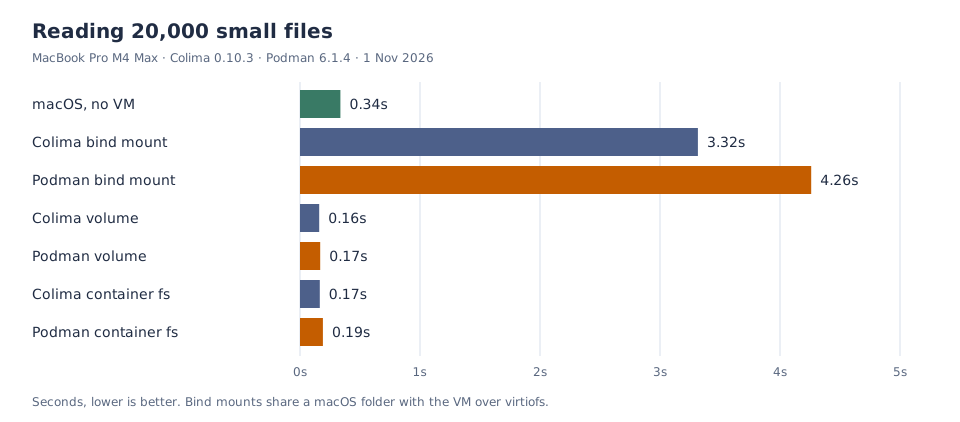
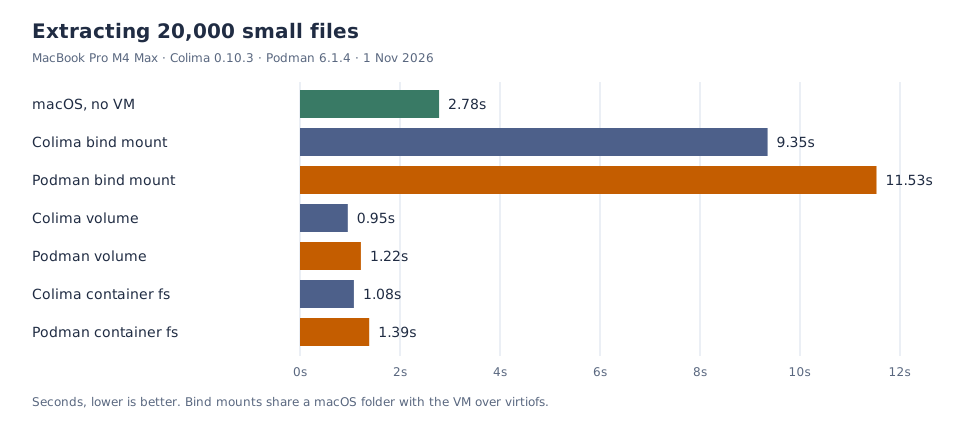
On a bind mount, both tools were slow. Reading 20,000 files took 3.32 seconds through Colima and 4.26 through Podman, against 0.34 seconds on macOS itself. Inside the VM, on a named volume or the container’s own filesystem, the same work took under 0.2 seconds, faster than macOS. Extraction showed the same pattern: 9.35 and 11.53 seconds on the bind mount, 0.96 and 1.22 on a volume. [reproduced]
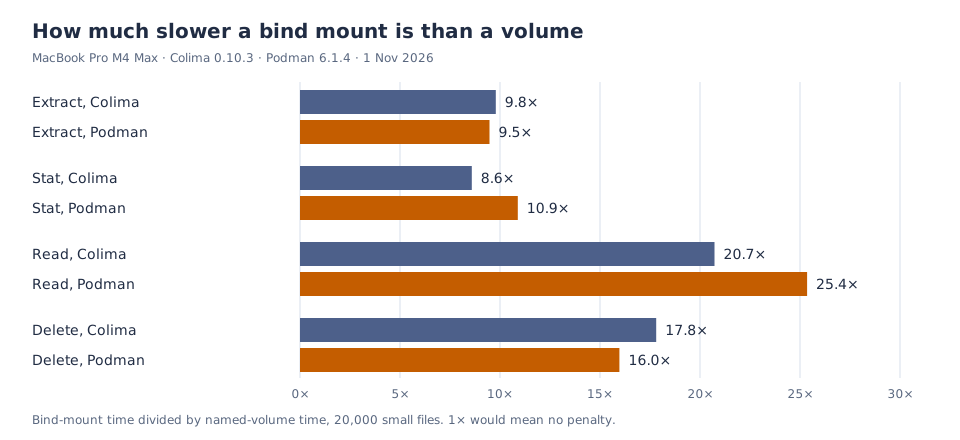
The bind-mount penalty was similar for both tools: 9.8 and 9.5 times on extraction, 17.8 and 16.0 times on deletion. On the bind mount, Colima was faster at extraction, stat and read, by 19 to 28 percent, and Podman was 12 percent faster at deletion. Inside the VM the two were within 8 percent of each other, except extraction, where Colima was 27 to 28 percent faster. [reproduced]
Docker Desktop uses virtiofs on the same Apple framework by default, so its default bind mounts are likely to land in the same range. That was not measured. [inferred]
Starts and builds
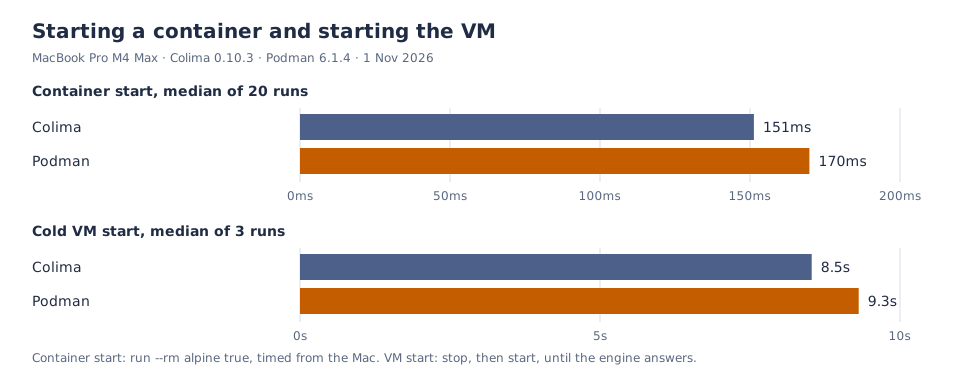
A container started in 151 milliseconds on Colima and 170 on Podman, a 12 percent difference that held across five rounds. Cold starts were closer: 8.5 and 9.3 seconds at the median, with Colima’s runs ranging from 8.5 to 11.6 seconds and Podman’s from 9.0 to 9.5. That is not a meaningful difference. [reproduced]
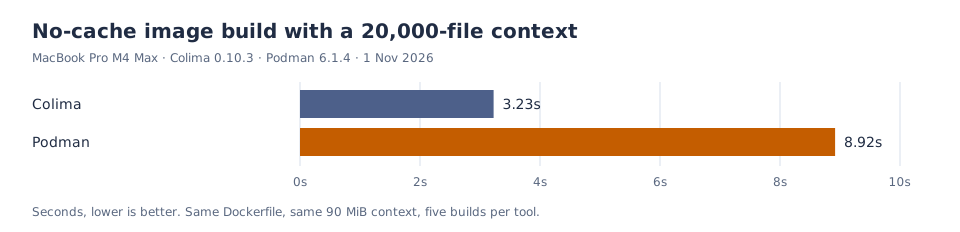
The build gap is larger. The same Dockerfile, the same 90 MiB context and the same base image took 3.23 seconds on Colima and 8.92 on Podman, with every run inside a 0.4-second band. Disabling SELinux labels on Podman’s build changed nothing: 8.68 to 9.05 seconds over three runs, so relabeling is not the explanation. Buildah’s handling of a 20,000-file context is the likely difference; that was not isolated. [reproduced]; [inferred]
git status and port throughput
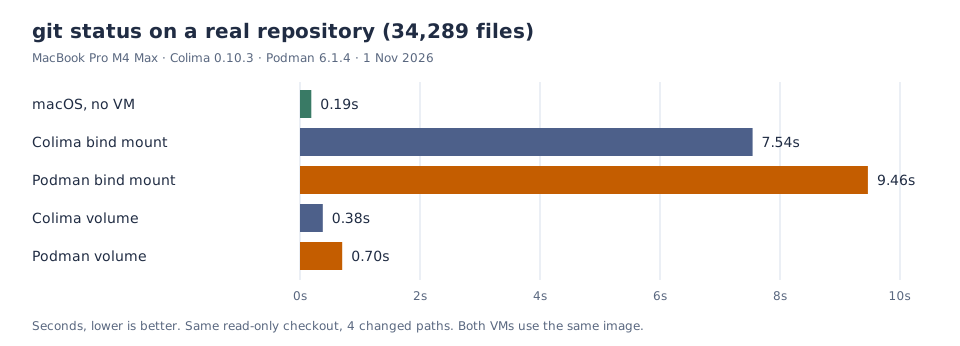
git status on the same checkout took 0.19 seconds on macOS, 7.54 through Colima’s bind mount and 9.47 through Podman’s. On a volume it took 0.38 and 0.70 seconds. The bind-mount penalty here is 40 times the macOS time for Colima and 50 times for Podman, wider than the 25 percent gap between the tools. One clone of the repository into a fresh volume took 4.03 seconds with Colima and 4.34 with Podman; that is a single observation, not a median. [reproduced]
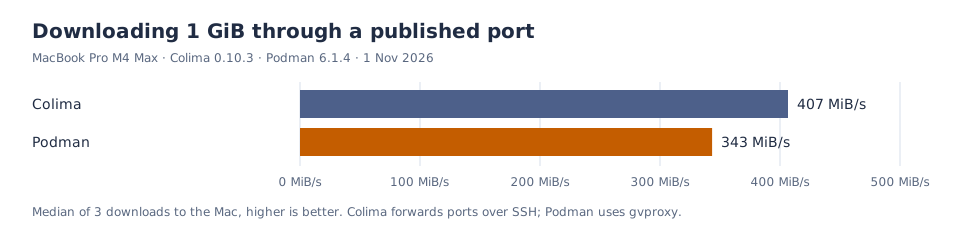
Downloading 1 GiB through a published port ran at 407 MiB/s on Colima and 343 MiB/s on Podman, a 16 percent gap. Colima forwards ports over SSH; Podman uses gvproxy. The numbers are medians of three downloads per round, across five rounds. [reproduced]
Memory each VM takes from the Mac
The Mac sees each VM as one process, so that process’s resident memory is what the containers cost the Mac. We sampled both every 10 seconds. After a cold start and 45 seconds of idle, Colima held 1.77 GiB and Podman 1.69 GiB; inside the guest, free reported 0.41 and 0.47 GiB used. At idle, the two are effectively tied. [reproduced]
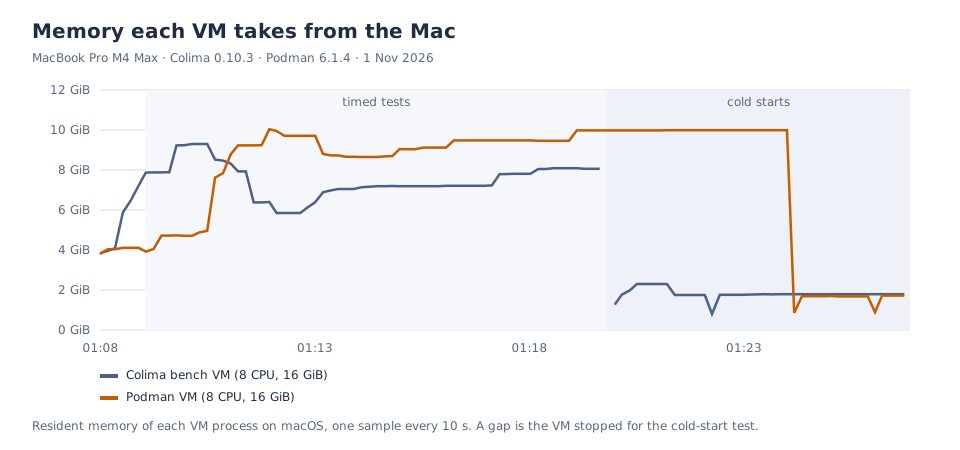
During the timed tests, Colima’s VM moved between 5.8 and 9.3 GiB, while Podman’s stayed between 7.6 and 10.0 GiB. Both figures include Linux page cache held for the containers, which macOS can reclaim; they are not a measure of memory pressure. Podman held its cache until the VM was stopped, while Colima released more of it during the run. [reproduced]; [inferred]
The other Colima VM on this Mac, the one with 40 containers, moved between 11.4 and 23.2 GiB over the same hour. It was not part of the test, but it shows how far a busy VM can drift from the idle figure. [reproduced]
Where each tool falls short
None of the three comes out of this clean, and the argument between their users mostly skips the faults.
Docker Desktop charges for the bind-mount fix. The slow path in the charts, a virtiofs bind mount, is also Docker Desktop’s default. The documented remedy, synchronized file shares, is only in paid plans, and Docker publishes no figure for it beyond “fast”. The one number Docker does give, that VirtioFS cut filesystem operation time “by up to 98%”, comes with no baseline and no method. On this Mac, a free named volume was 8.6 to 25 times faster than the bind mount on small files, in both free tools. [vendor]; [reproduced]
The free tier is narrower than it sounds. The thresholds are joined by “AND”: a 30-person company with $10 million in revenue already needs a paid plan, and government entities pay at any size. The pricing table gives no monthly price for Business. [vendor]; [inferred]
Docker Desktop changes constantly. Its release notes list 57 releases in the twelve months to 26 October 2026, from 4.50.0 on 6 November 2025 to 4.97.0. In that time Docker VMM, still in beta, swapped libkrun for Docker’s own implementation in 4.86, and 4.97.0 removed osxfs, migrating anyone still on it. A team that checks each desktop update before rolling it out faces close to one release a week. [vendor]; [inferred]
Colima rests on one person. GitHub’s contributor list shows 508 commits from its creator; the next human contributor has 7. The latest release, 0.10.3, is from 4 June 2026, and fixes merged in September and October are not in a release yet, so Homebrew users do not have them. A company that replaces a paid product with Colima also replaces vendor support with GitHub issues. host.docker.internal resolved to the Mac in this test, but Colima does not document it. [vendor] (contributors (opens in a new tab), commits (opens in a new tab)); [reproduced]
Podman’s documentation and Podman disagree. The 6.0.0 release notes and the podman-machine page give libkrun as the Mac default; the machine Homebrew’s Podman created here was applehv, and the containers.conf(5) page still lists applehv as the default. The compatibility layer is documented as supporting “the Docker v1.40 API”, while the Docker Engine in Colima speaks API 1.54. [vendor] (containers.conf (opens in a new tab), podman system service (opens in a new tab)); [reproduced]
Podman skips fsync in --rm containers. Since version 3.2.0, released in 2021, containers created with --rm “automatically use the volatile storage flag”, so that their root filesystems do not “write changes to disk as often”. The Linux kernel documentation says that with this flag “all forms of sync calls to the upper filesystem are omitted”. The trade is reasonable for a container that is deleted on exit. The podman run manual page does not mention it, so anyone benchmarking disk writes or a database in a throwaway Podman container measures writes that never reached the disk. The first run of this test did exactly that. [vendor] (Podman release notes (opens in a new tab), overlayfs (opens in a new tab)); [reproduced]
Podman was slower on this Mac in several tests. The image build took 2.8 times as long, git status on a volume took 1.8 times as long, port throughput was 16 percent lower, and small-file work was 23 to 28 percent slower. It was 12 percent faster at deleting 20,000 files. None of this makes it unusable, and the build gap survived the SELinux test, so the cause is not the obvious one. Anyone adopting Podman for a build-heavy workflow should run their own build before standardising on it. [reproduced]; [inferred]
The original claim aims at the wrong target. Moving from Docker Desktop to Colima or Podman keeps an Apple Virtualization VM and a virtiofs bind mount. The 8.6- to 25-times file penalty in the charts moves with the developer. [inferred]
What the evidence supports
The claim that nobody should run Docker Desktop does not hold. For small companies Docker Desktop is free. For large ones, the fee buys central settings control, container isolation and a paid answer to the bind-mount cost measured here. Choosing it in those cases is a reasonable trade, even though the free remedy, a named volume, worked just as well on this Mac. [inferred]
A narrower version of the claim holds. Colima and Podman ran on the same kind of VM and the same file sharing that Docker Desktop uses by default. A company above the licence thresholds that uses none of the paid features pays for a VM, file sharing and engine that the free tools provide, and in return gets vendor support and an update almost every week. [inferred]
Between the free tools, Colima was faster on most of what we measured: file reads and writes, container start, builds, git status and port forwarding. Podman was faster on deletion and tied on CPU, idle memory and cold start. The gaps are real but smaller than the bind-mount penalty, and the build result in particular needs checking against a different context size before it is treated as general. [reproduced]; [inferred]
On this Mac, the biggest speed gain did not come from switching tools. It came from moving busy file trees, such as dependencies, build output and repositories, off the bind mount and into a volume. That change was worth 8.6 to 25 times on small files and 20 times on git status; switching between Colima and Podman was worth 12 to 28 percent, except for builds. [reproduced]
Sources
- Docker: Desktop licence (opens in a new tab) (modified 28 September 2026), subscription agreement (opens in a new tab) (26 August 2026), pricing (opens in a new tab), Docker VMM (opens in a new tab), settings (opens in a new tab), release notes (opens in a new tab) (4.97.0, 26 October 2026), synchronized file shares (opens in a new tab), Settings Management (opens in a new tab), Enhanced Container Isolation (opens in a new tab), networking (opens in a new tab); retrieved 31 October 2026.
- Colima and Lima: Colima repository (opens in a new tab), v0.10.3 (opens in a new tab) (4 June 2026), contributors (opens in a new tab) and commits (opens in a new tab) (read through the GitHub API on 31 October 2026), Lima repository (opens in a new tab), VM types (opens in a new tab), mounts (opens in a new tab).
- Podman: podman-machine (opens in a new tab), release notes (opens in a new tab) (3.2.0; 6.0.0, 24 June 2026), v6.1.4 (opens in a new tab) (12 October 2026), podman-run (opens in a new tab), podman system service (opens in a new tab), containers.conf(5) (opens in a new tab), containers-storage.conf(5) (opens in a new tab).
- Linux: overlayfs documentation (opens in a new tab), “Volatile mount”.
- OrbStack: pricing (opens in a new tab), terms (opens in a new tab).
- Measurements: Colima 0.10.3, Lima 2.2.1, Ubuntu 24.04.4, kernel 6.8.0-117, Docker Engine 29.5.2,
vzwith virtiofs, 8 CPUs, 16 GiB, emptybenchprofile; Podman 6.1.4,applehv, Fedora CoreOS 44, kernel 7.2.7, 8 CPUs, 16 GiB;python:3.13-alpine@sha256:7984cf56…; 1 November 2026, timed tests 01:09 to 01:20 UTC, cold starts 01:20 to 01:28 UTC, five interleaved rounds, three cold starts per tool, memory sampled every 10 seconds. Podman build side test with--security-opt label=disable, three runs. Raw results, the benchmark scripts and checksums are kept with the research notes.


